Dashboard
Alerts Dashboard in Configuration Menu
Audience:
AdministratorsSkill Prerequisites:
Understanding of System Health
With the release of Plant an App version 1.28.457 and above, the Configuration page now features a Dashboard. This dashboard replaces the previous "Getting Started" page and provides a comprehensive view of system health alerts.
Overview of Alerts Dashboard
The Alerts Dashboard is designed to provide critical health check information for your system by displaying various alerts. These alerts are categorized based on severity:
- Critical
- Medium
- Warning
The dashboard includes several types of alerts focusing on system health checks. See Current Alerts for the full list.
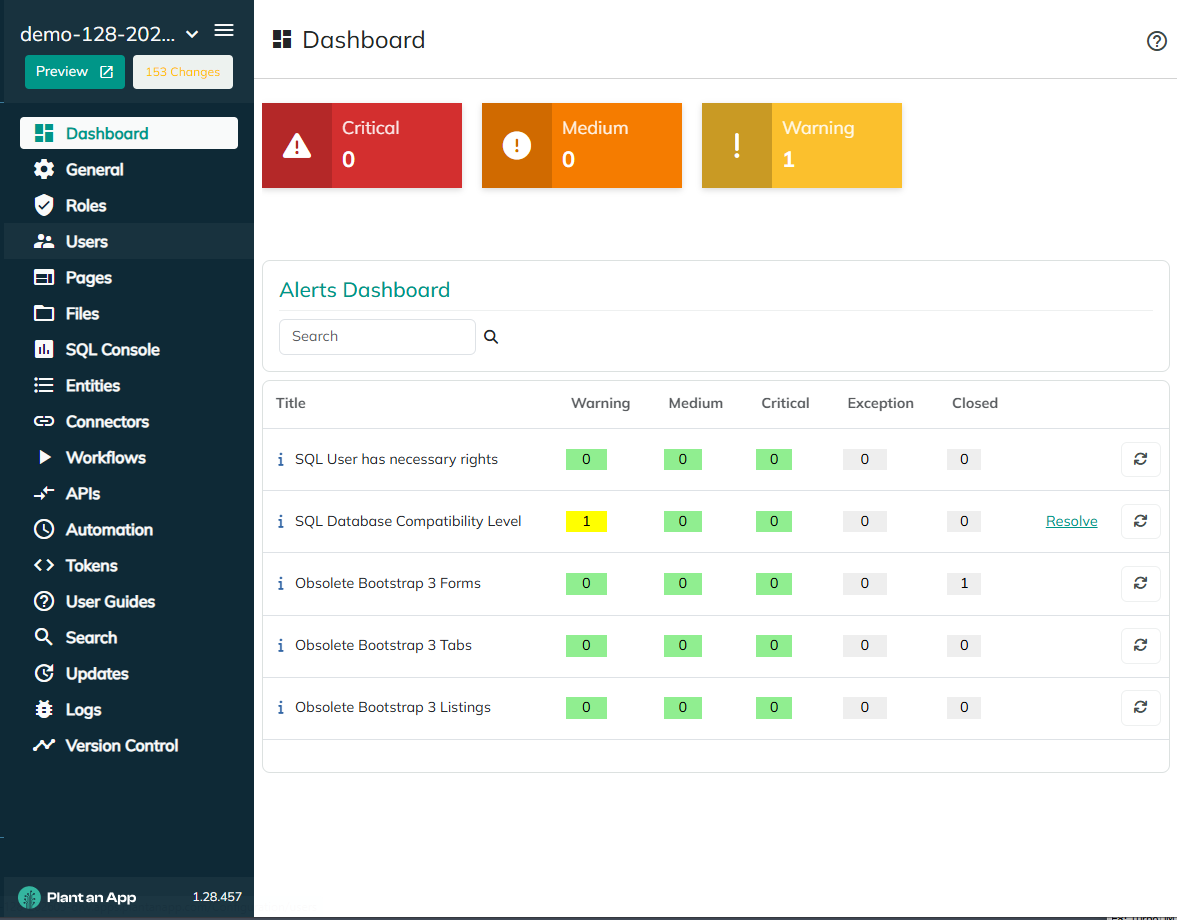
Dashboard Features
-
Key Tiles: Displaying the count of current critical, medium, and warning alerts for quick reference.
-
Alerts List: Displays detailed information on each alert type, including the number of warnings, mediums, and critical alerts. The table format includes:
- Title of the alert
- Counts for warnings, mediums, and criticals
- Exception and Closed status
-
Alert Colors:
- Green: Indicates no open alerts in that category.
- Yellow: Represents a warning alert.
- Orange: Indicates a medium-level alert.
- Red: Used for critical alerts.
Managing Alerts
- Information Icons: Positioned next to alert titles, providing more details about each alert type.
- Resolve Alerts: Click on the resolve option to start addressing an alert using provided guidance.
- Refresh Button: Allows manual refresh of a specific alert to see if it has been resolved or updated.
- Alert Details: Clicking on alert counts provides further details, including severity, status, creation, and closure dates.
Handling Exceptions
You have the option to mark specific alerts as exceptions, providing a reason for the exception. These exceptions will not be counted in future alert evaluations.
Resolving Alerts
When resolving alerts, detailed instructions are provided. Users may also find hyperlinks in the instructions linking to related documentation for more comprehensive guidance.
Alert Schedule
The dashboard’s alerts are set to update automatically on a schedule, usually once per day, giving you the latest snapshot each time you visit the page. However, individual alerts can be refreshed manually using the refresh button.
Current Alerts (as of version 1.28)
- SQL User Rights: Ensure SQL users have the necessary permissions prior to upgrades.
- IIS User Rights (Coming Soon): Alerts when the IIS user identity (the site's application pool identity) does not have Full Control on files that may be updated during an upgrade. The alert details show how many files lack Full Control. This alert must be resolved before upgrading — an unresolved IIS User Rights alert will block the upgrade. Resolve it by granting the application pool identity Full Control on the site folder, as described in Grant the IIS user identity Full Control.
- SQL Database Compatibility Level: Alerts if compatibility levels are not aligned with the SQL version.
- Portal Aliases are Valid: Alerts when a site alias includes the
http://orhttps://prefix; only the domain name should be present. Resolve via the Persona Bar under Settings > Site Settings > Site Behavior > Site Aliases. - Obsolete Bootstrap 3 Components: Alerts for any remaining Bootstrap 3 elements, as support will be removed in version 1.29. These alerts must be resolved before upgrading — unresolved Bootstrap 3 alerts of any of the types below will block the upgrade to the next version. Reported separately for each component type:
- Forms
- Tabs
- Listings
- Entity
- NavXP Theme
- Search Templates
- PageBuilder Pages
- Obsolete API Endpoint Method DataSource in Listing: Alerts when a listing uses the obsolete API Endpoint Method as a Data Source. Update the listing to use a Server Request (JSON) Data Source before upgrading to the next version.
- Obsolete API Endpoint Method DataSource in Form: Alerts when a form uses the obsolete API Endpoint Method as a Data Source. Update the form to use a Server Request (JSON) Data Source before upgrading to the next version.
- Obsolete Execute API Method Action: Alerts when an action still uses the obsolete Execute API Method. Replace it with a Server Request action before upgrading to the next version.
This enhanced dashboard ensures that administrators are always aware of potential issues within their system, allowing for timely interventions and ensuring optimal system health.
Revised 09/23/2026