Support
Audience:
Citizen Developer
Skill Prerequisites:
Basic Knowledge of Plant an App Platform
The support option in the Plant an App platform is designed to assist users in addressing various challenges they might encounter. Whether you're seeking help with platform functionalities, specific development tasks, or error resolution, the support option is your starting point.
Support Menu Features
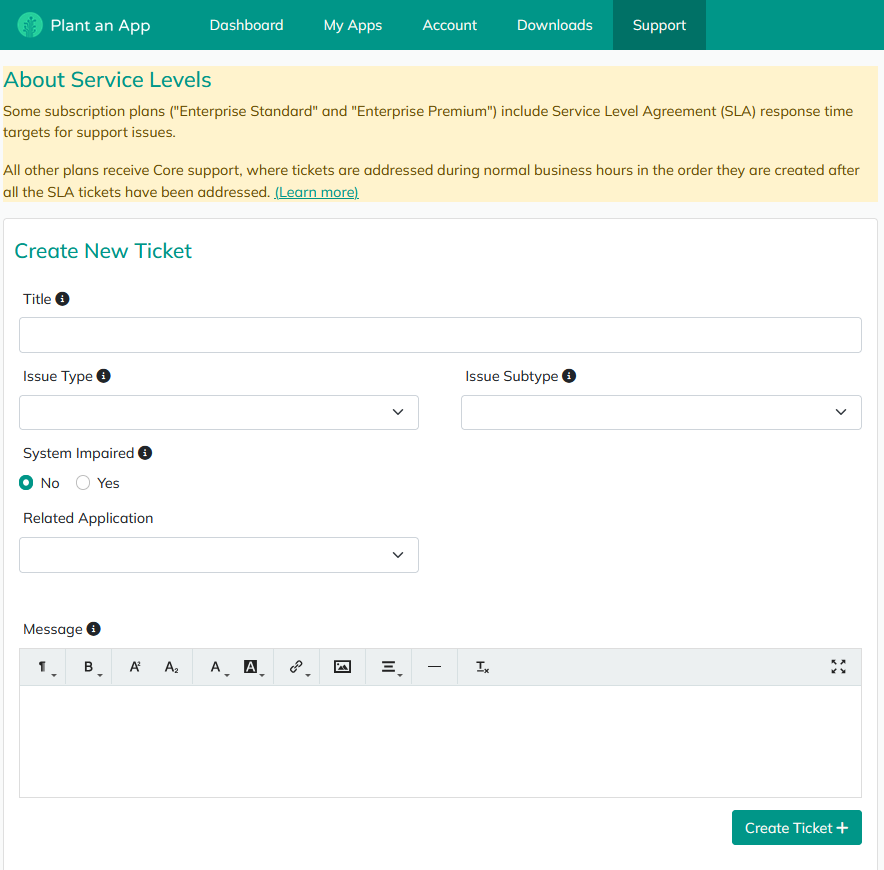
The support option on the main menu allows users to:
-
Create New Tickets: When you encounter an issue or have a question, you can create a new support ticket. This initiates a request with the support center staff who will assist you in resolving your queries. The support team is committed to responding within the Service Level Agreement (SLA) response time targets. For more details, refer to the "About Service Levels" topic on the support page.
-
Review Existing Tickets: You can open and review your current and past tickets to track the progress of your inquiries and any ongoing assistance.
-
Community Portal Access: In addition to formal support tickets, there's a Community button that leads you to the community portal. Here, you can post questions in the forum, which is monitored by both support staff and other Plant an App clients. This can be a valuable space for broader discussion and client interaction.
When to Use Support Tickets vs. Community Portal
- Support Tickets: Best used for questions or issues that are confidential or require direct support staff intervention. These tickets are not public, and only the support team can view and respond to them.
- Community Portal: Ideal for non-confidential questions that might benefit from community input. It's important to note that if the topic requires specific or private answers, opting for a support ticket is the better choice.
Interaction Process
- When you create a support ticket, it will be logged and a support team member will engage with you directly.
- Upon receiving a response, you'll get an email notification prompting you to check the ticket and reply to continue the discussion.
- Once your issue is resolved, you'll receive an email from Plant an App urging you to provide feedback. This input is crucial for the support team management to ensure high-quality service delivery.
Plant an App values your feedback to continually improve support services. Whether through the dedicated support team or the collaborative community portal, you have several avenues to get the help you need.
Revised 01/06/2026