Record Owners and Can Read
Record owners and the Can Read permission are concept features. They're still being developed and can change before they're released.
Audience:
Low-code EngineersSkill Prerequisites:
Entities,Roles
General Description
Two additions to entity permissions give you finer control over who sees and changes records:
- Can Read separates reading an entity's data from seeing its pages. A role can let workflows, APIs and data sources read records as the user, without the entity's pages appearing in that user's menu.
- Record owners give each record an owner who can differ from its creator. Own Entries permissions then mean the records the user owns, and an owner can hand a record to someone else.
Both matter for Entity Lifecycle: a role named on a transition needs only Can Read to run it, and "own records" in a lifecycle means the owner on an entity with record owners. Neither needs a license feature of its own.
Can Read and Can View
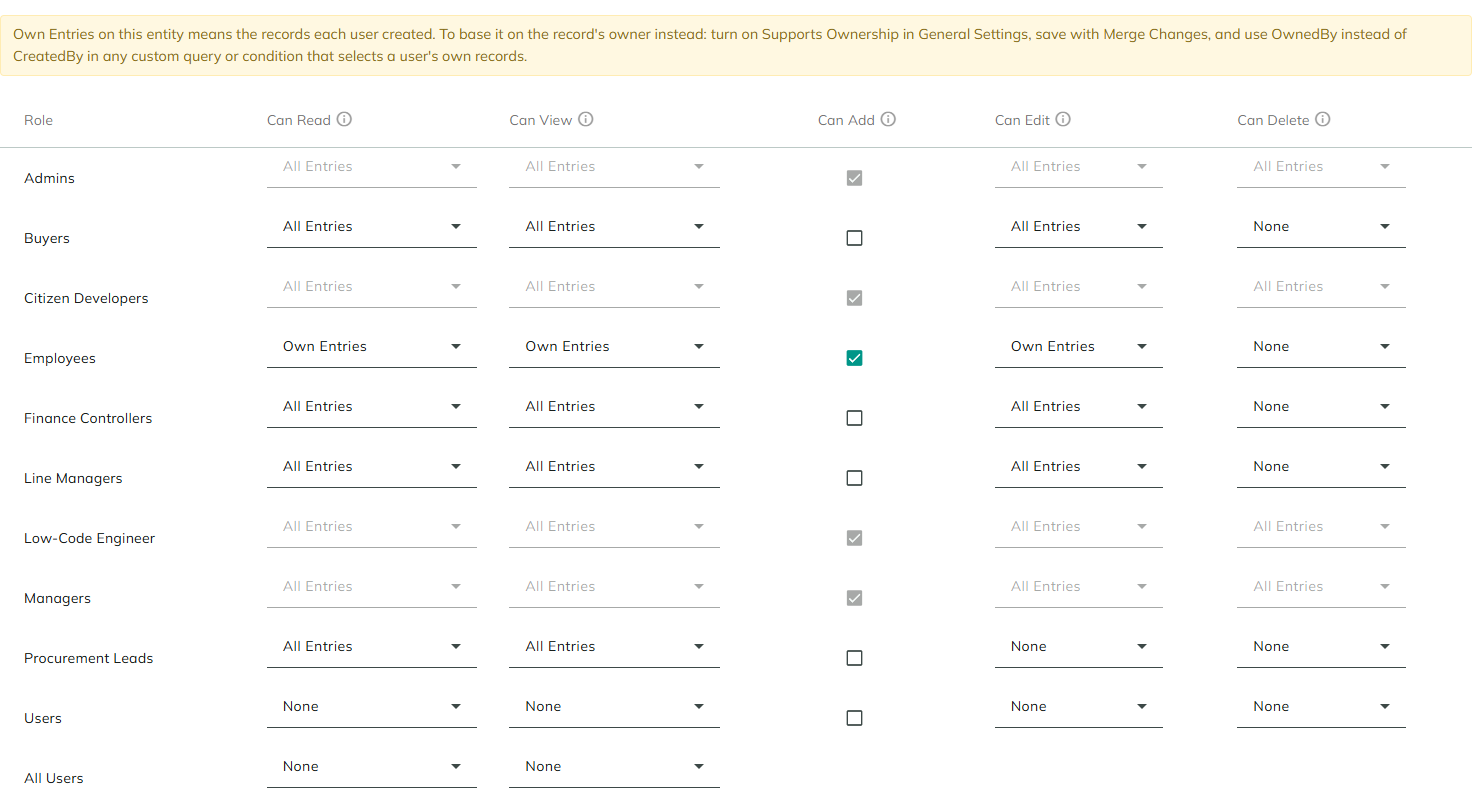
The Permissions tab has a Can Read column before Can View. Each column has a help icon that says what it allows.
| Permission | What it allows |
|---|---|
| Can Read | Lets workflows, APIs and data sources read this entity's records as the user. Doesn't show the entity's pages. |
| Can View | Shows the entity's pages (listing, details, forms) and its menu entry. Includes Can Read. |
| Can Add | Lets the user add records, from the entity's pages and through workflows and APIs. |
| Can Edit | Lets the user change records, from the entity's pages and through workflows and APIs. With ownership on, this includes changing a record's owner. |
| Can Delete | Lets the user delete records, from the entity's pages and through workflows and APIs. |
Can Read, Can View, Can Edit and Can Delete take All Entries, Own Entries or None, as before.
What Each Permission Controls
| Uses Can Read | Uses Can View |
|---|---|
| The entity's Read and Read All actions, and the workflows and forms that use them | The entity's page and detail page, and its menu entry |
| Data sources and entity reference fields that list the entity's records | The listing grids, including the entity's listing on a parent's page and any grid on the entity's data source |
| Dashboard metrics | The Export button |
| The generated REST Read and Read All endpoints | Site search results |
| The files of the records |
A grid lists the records the user can view. A user whose role has Can View on Own Entries sees only their own records in a grid, even when another of their roles has Can Read on All Entries.
Rules
- Can View never exceeds Can Read. In the Permissions tab, raising Can View raises Can Read to the same scope, and lowering Can Read lowers Can View to match. The server applies the same rule on every save, imports included.
- The All Users role has only Can Read and Can View, each with All Entries or None.
- Page visibility changes when the entity is saved with Merge Changes. Only roles with Can View other than None see the entity's pages.
- Existing entities keep working. Permissions saved before Can Read existed get a Can Read equal to their Can View.
For example, give Finance Controllers Can Read on All Entries and no Can View on Purchase Requests: a report workflow run as a finance controller can read every request, while the Purchase Requests page doesn't appear in their menu.
Record Owners
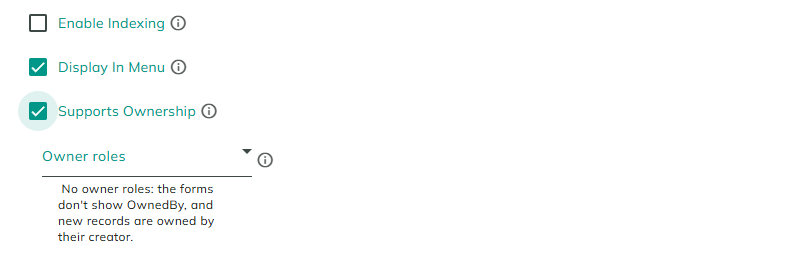
Record owners are off for every entity until you turn them on, in the entity's General settings.
| Setting | Description |
|---|---|
| Supports Ownership | Each record gets an owner (OwnedBy). A new record is owned by the person who creates it, unless the form, workflow or API sets another owner. Own Entries permissions then mean the records the user owns. Not shown on built-in entities. |
| Owner roles | Shown while Supports Ownership is checked. The users of these roles are the ones the entity's Add and Edit forms offer in the OwnedBy field. People filling in the forms see only these users, and don't need to read the User entity. Every role but All Users is listed. Without owner roles, the forms don't show OwnedBy, and new records are owned by their creator. |
Turning Ownership On
Check Supports Ownership and save the entity. The save dialog applies the change to the entity's pages, forms, grids, APIs, permissions and tabs, so it offers only Merge Changes and Cancel. The save:
- Adds OwnedBy to the entity's system properties and its table.
- Makes the creator of every existing record its owner.
- Adds OwnedBy to the generated REST endpoints, and, while there are owner roles, to the Add and Edit forms.
Choosing the first owner role, or removing the last one, adds or removes the forms' OwnedBy field, so that save also needs Merge Changes. Other changes to the owner roles apply at once.
Who Owns a Record
A new record is owned by the user who creates it, unless an owner is given. Records created by visitors who aren't signed in have no owner.
The owner changes like any other value:
| Where | How |
|---|---|
| Generated Add and Edit forms | The OwnedBy field, while the entity has owner roles. It lists the users of the owner roles. On Add it proposes the current user. Left empty, the creator becomes the owner on Add, and the owner is kept on Edit. |
| The entity's Create and Update actions | The Owned By parameter: a user ID. Empty makes the current user the owner of a new record, and keeps the owner of an existing one. |
| The entity's Partial Update action | The property OwnedBy, with a user ID. |
| Generated REST API | Create and Update accept OwnedBy; Read, Read All and Create return it. |
Anyone who can edit a record can change its owner. The owner roles limit only what the forms list: a workflow or API call can set any user. With Can Edit on Own Entries, a user can give their record to someone else but can't take someone else's.
What Own Entries Means
| Entity | Own Entries means |
|---|---|
| Supports Ownership on | The records the user owns. Own Entries is offered in every Can Read, Can View, Can Edit and Can Delete cell. |
| Supports Ownership off | The records the user created. Own Entries is offered only in the cells that already used it when you opened the entity. |
The same meaning applies to a lifecycle's Only on the user's own records and to the Own records only of permissions by state.
On an entity without ownership that uses Own Entries, the editor shows how to base it on the owner: turn on Supports Ownership, save with Merge Changes, and use OwnedBy instead of CreatedBy in your own queries and conditions that select a user's records.
Turning Ownership Off
Clear Supports Ownership and save with Merge Changes. The editor warns: "Turning ownership off permanently deletes the owner of every record when you save." The save also removes the owner's columns from the entity's listings, including columns you added.
You can't turn ownership off while any permission is set to Own Entries. Change those permissions first.
Messages
| Message | Reason |
|---|---|
| Turning ownership on or off must be saved with Merge Changes. | Ownership was changed in a save without Merge Changes. |
| Choosing the first owner role, or removing the last one, must be saved with Merge Changes. | The forms' OwnedBy field would change in a save without Merge Changes. |
| Change the permissions set to Own Entries before turning off ownership. | A permission still uses Own Entries. |
| Own Entries for {permission} of the {role} role needs Supports Ownership to be on. | Own Entries was chosen on an entity without ownership. |
| OwnedBy is reserved for the record's owner. Choose another name. | A property was named OwnedBy. |
| Rename the {property} property before turning on ownership. OwnedBy is reserved for the record's owner. | The entity already has a property named OwnedBy. |
| Current user does not have permissions to read entity {Entity}. | The user's Can Read doesn't allow reading the entity. |
Considerations
- Built-in entities never have owners.
- Turning ownership off can't be undone. The owners are deleted. Turning it on again makes each record's creator its owner.
- Owners aren't checked. An owner given by a workflow or the API is saved as given.
Revised 11/12/2026