Record History
Entity Lifecycle is a concept feature. It's still being developed and can change before it's released.
Audience:
Low-code EngineersSkill Prerequisites:
Entities
General Description
Record History keeps an audit trail of an entity's records: who created, changed, moved through the lifecycle or deleted each record, when, and what changed. You turn it on per entity, on the entity's History tab, which also lists everything recorded. Each record's detail page gets a History tab with that record's entries.
Record History is part of the Enterprise plan (Lifecycle.History). Without it, the History tab shows a lock with "Record history is part of the Enterprise plan.", and nothing is recorded.
It works on any entity you create, with or without a lifecycle.
Turning On Record History
Open the entity in Configuration > Entities and go to the History tab. It comes after the Lifecycle tab, or after Permissions when the entity has no State property.
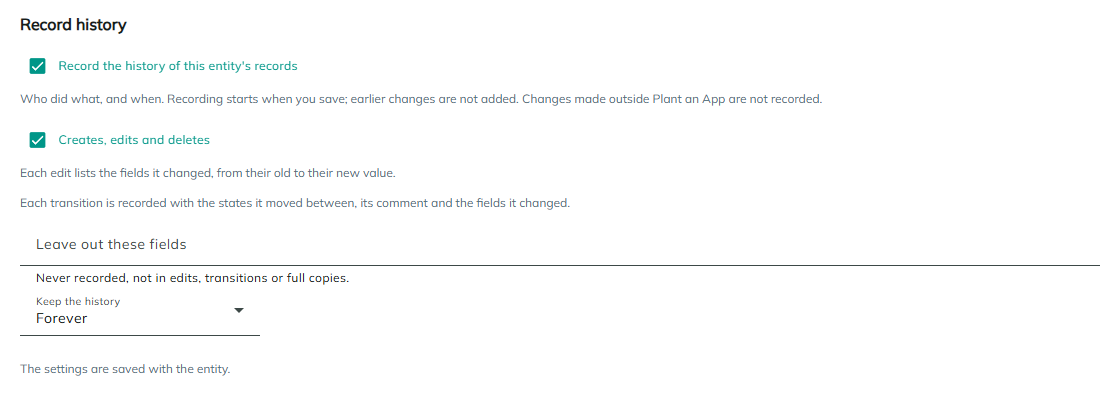
| Setting | Description | Default |
|---|---|---|
| Record the history of this entity's records | Turns Record History on. Recording starts when you save; earlier changes aren't added. | Off |
| Creates, edits and deletes | Records new records, edits and deletes. Each edit lists the fields it changed, with their old and new values. Transitions are recorded whatever this setting is. | On |
| Leave out these fields | Properties that are never recorded: not in edits, transitions or full copies. Use it for large or sensitive fields. Only saved properties are listed. | None |
| Transitions of {State property} | Shown only when the entity has more than one State property: whether that property's transitions are recorded. | On |
| Keep the history | Forever, or For a number of days. See Retention. | Forever |
The settings are saved with the entity, after its lifecycles. If they can't be saved, the entity editor stays on the History tab and shows the reason.
What Is Recorded
Each change writes one entry, right after the change is saved:
| Change | Recorded |
|---|---|
| Created | A new record, with the user who created it. |
| Edited | Each field whose value changed, as "{Property}: {old} → {new}", with "(empty)" for no value. A change of the record's owner shows as "Owner: {old} → {new}", with the users' names. An edit that changes nothing writes no entry, and a value saved again in another notation, such as 650.00 for 650, isn't a change. |
| Deleted | The deleted record, with its name. |
| A transition | The transition's name, the states it moved between, the comment, and the fields it saved whose values changed. |
Every entry keeps the record's ID and its name at the time, the user and the date and time. A transition's entry keeps the transition's name as it was. States show by their current name, or by their key when the state was removed. Entries are kept when the record is deleted.
These aren't recorded:
- Changes made outside Plant an App, for example directly in the database.
- Changes of the entity's relations, when records are linked or unlinked.
- Changes the platform makes for you: the owners filled in when ownership is turned on, and the initial state given to records without one when a lifecycle is saved.
- Fields listed in Leave out these fields.
On a built-in entity, the History tab shows only while the entity has a State property, and it records only its transitions.
Full Copies
An entry normally keeps only the fields that changed. To keep every field as it is after a transition, check Keep a full copy of the record on the transition in the Lifecycle tab. The setting shows while Record History is on and records that transition's State property. Fields in Leave out these fields aren't copied.
A full copy shows to everyone who can see the record's history.
The Entity's History
Below the settings, the History section lists what was recorded for the entity's records, newest first, 50 at a time. Click Load older entries for more.
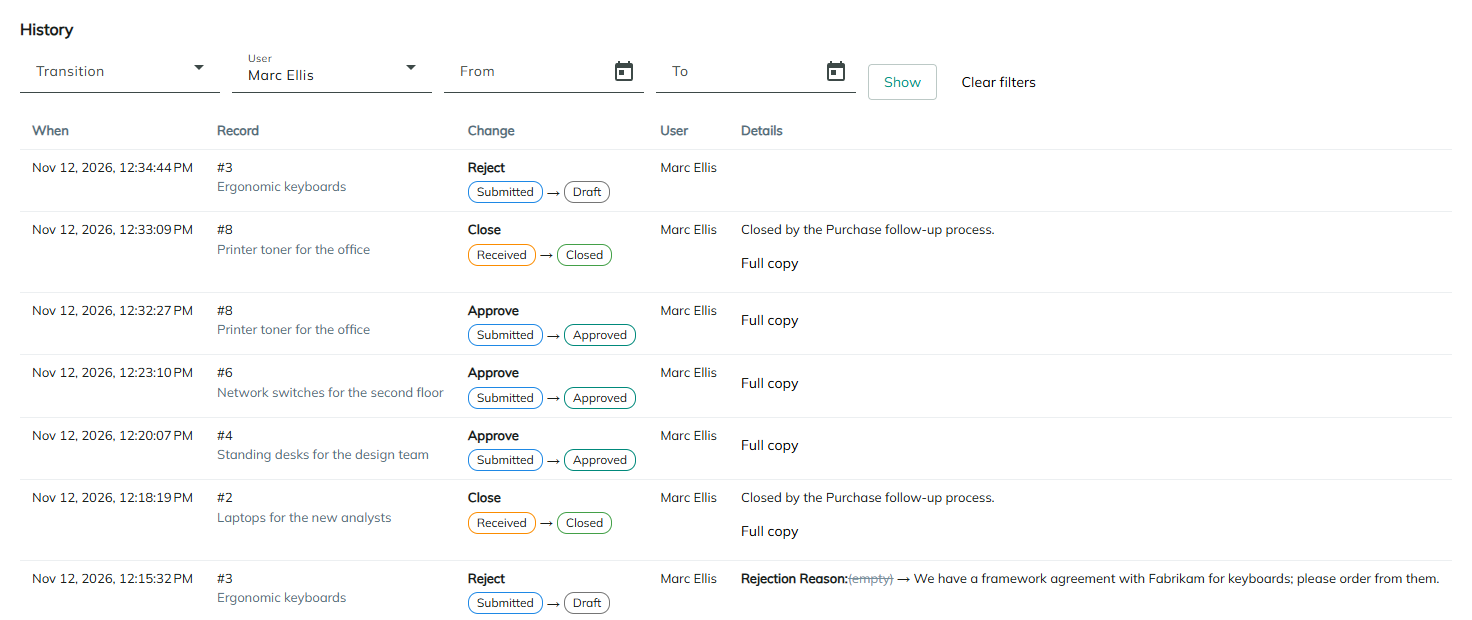
Filter it with Transition, User, From and To (dates, both included), then click Show. Clear filters removes them. With several State properties, a State property filter narrows the list and the transitions to one of them.
| Column | Description |
|---|---|
| When | The date and time of the change. |
| Record | The record's ID and its name at the time. |
| State property | Only with several State properties. |
| Change | Created, Edited, Deleted, or the transition's name followed by the states it moved between. |
| User | The user's name, or "User #{id}" for a user who was deleted. |
| Details | The comment and the changed fields. On an entry with a full copy, Full copy shows every field. |
A Record's History Tab
While Record History is on, the entity's detail page has a History tab after Details and the relations' tabs. It lists the entries of the record that's open, newest first.
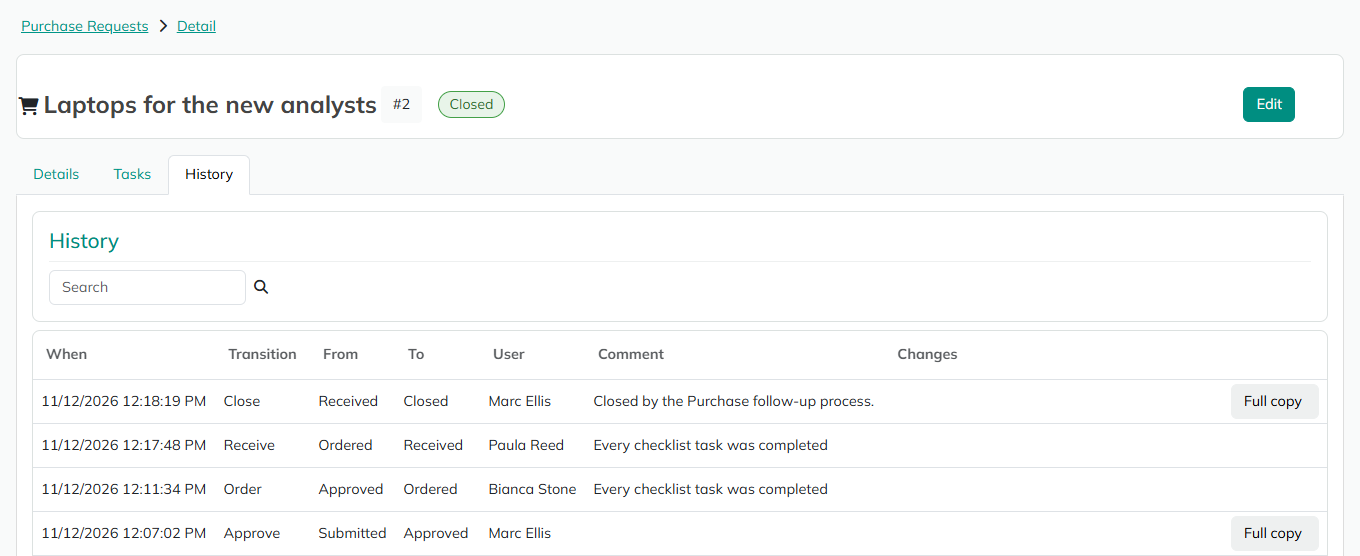
Its columns are When, Transition (or Created, Edited or Deleted), From, To, User, Comment and Changes, plus State property with several State properties. An entry with a full copy has a Full copy button, which opens "Full copy after {Transition}" with every field.
Everyone who can open the detail page sees the tab, but only for records they can read: for a record the user can't read, the tab is empty. The tab and its listing are added when Record History is turned on and removed when it's turned off. Changes you make to the listing are kept.
Retention
With Keep the history set to For a number of days, enter the Days (at least 1; 365 when you first choose it). Entries older than that are deleted when the site starts. With Forever, nothing is deleted.
If the site's license no longer includes Record History, nothing is recorded and retention deletes nothing, so the trail is kept until the license allows it again.
Considerations
- The history is written after the change. The entry isn't part of the change's database transaction, because the record can live in another database. If the entry can't be written, the change stays saved and the error is logged.
- Imports write one entry per new record. There's no setting to skip the history during an import.
- There's no separate permission for the history. Full copies show to everyone who can see the record's history.
Revised 11/12/2026