The Mobile Screen New in 2.0
Audience:
Low-code EngineersSkill Prerequisites:
Listings,Forms
General Description
Configuration > Mobile is where you choose what works in the mobile app without a connection, and see the phones connected to the site. Everything else in the app follows the site: its menu, pages, lists, forms and permissions.
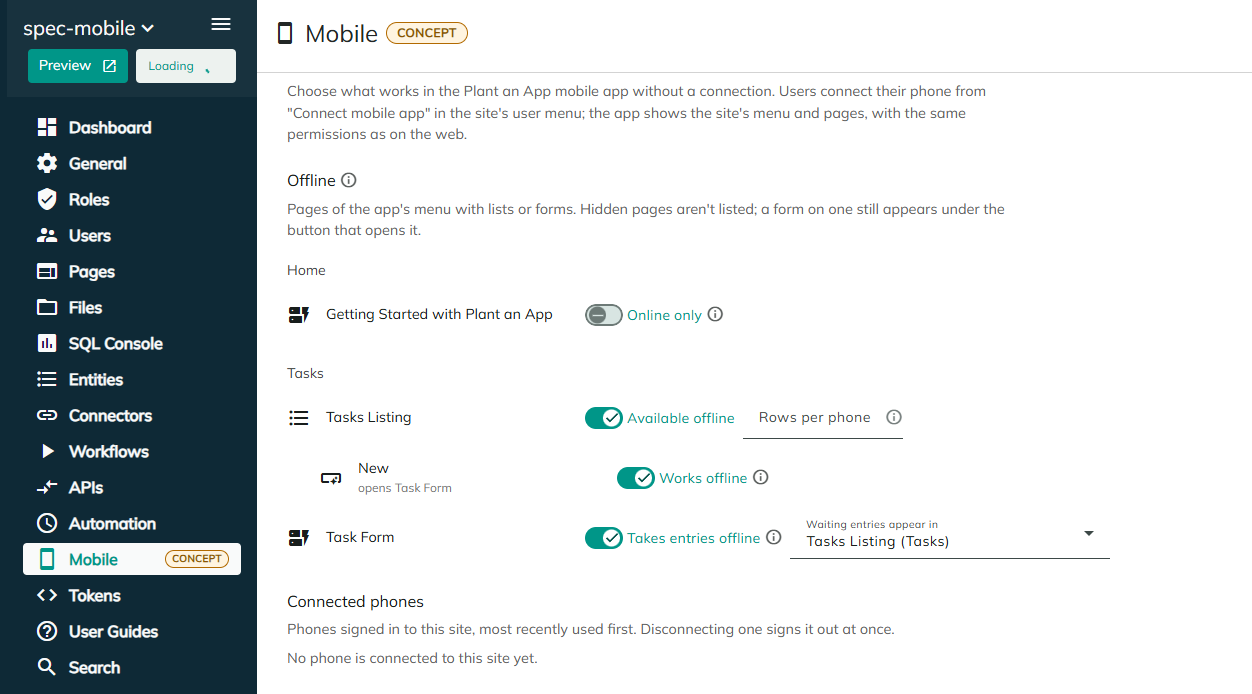
Offline
The Offline section lists the pages of the app's menu that have lists or forms. Hidden pages aren't listed; a form on one still appears under the button that opens it.
Lists
| Setting | Description |
|---|---|
| Available offline / Online only | Available offline saves the list on each phone, so people can browse and search it without a connection. It's refreshed when the app opens and when people pull to refresh. |
| Rows per phone | The most rows each phone saves, from 1 to 10,000. The list's own filters and sorting decide which rows, so filter by the current user (for example "my open jobs") to keep it small. Empty: 2,000. |
Buttons That Open a Form
Under each list, each button that opens a form has Works offline / Online only. With Works offline, the button opens its form on the phone without a connection. The entries wait on the phone, appear at the top of the list marked as waiting, and are sent when the phone is back online.
Works offline is the same setting as the form's Takes entries offline, with this list as Waiting entries appear in: changing one changes the other.
The form's actions run when the entry is sent, so they shouldn't depend on the moment it's sent.
Forms
| Setting | Description |
|---|---|
| Takes entries offline / Online only | Takes entries offline lets people fill in the form without a connection. The entries wait on the phone and are sent when it's back online. |
| Waiting entries appear in | The list where the waiting entries show, marked as waiting. No list: they show only in the app's outbox. |
Connected Phones
The phones connected to the site, most recently used first, with the person's name, when the phone was last used and when it was connected.
Disconnect signs the phone out at once. The person needs to connect it again from Connect mobile app, and entries still waiting on the phone aren't sent. Use it for a lost phone or for someone who leaves.
Considerations
- Only the lists, forms and buttons on the pages of the app's menu are listed here.
- People can also disconnect their own phones, from Connect mobile app. See Connecting the Mobile App.
Related Pages
Revised 11/13/2026