Document Management System
Audience:
Low-code Engineers,System/Security AdministratorsSkill Prerequisites:
Entities,Workflows,Automation,APIs
General Description
The Document Management System (DMS) is a solution built on Plant an App 2.0 for public institutions. It covers the internal document work of an institution: the registry office, the document repository, cases, tasks, approval and signing, archiving and retention, reports, audit and functional administration. A REST API connects it to the institution's portal and business applications.
This page describes the reference DMS application on Plant an App 2.0.161 (November 2026). The Romanian names of its menus and actions are used, with the English meaning next to them. See Glossary.
What the DMS Covers
The DMS is the internal document management application. The institution's external portal (its public website, citizen accounts and e-services) is a separate application. The DMS provides the server side the portal works with: document intake, case status, dispatch and petitions, through its Integration API.
Connected Services
Some steps hand work to a specialised service. The DMS has the step, its statuses and its data; the service is connected per installation.
| Step | In the DMS | Connected service |
|---|---|---|
| OCR | An intake step with its own statuses, which fills in the text and the page count. | An OCR engine. See Extending the DMS. |
| Signing | A step of every outgoing flow. It records the signer, time and outcome, and the signed version becomes the official one. | The user's own token through PDF AutoSigner, or an accredited signature provider. |
| Document generation | HTML templates with placeholders, generated from the case page. | Word templates with the Word add-on, and PDF files with the PDF Generator add-on. |
| Email intake | The intake API files documents from any channel and never files the same reference twice. | A mailbox, through the platform's IMAP and POP3 triggers. |
At a Glance
- Registry: five registers with their own prefixes and yearly numbering, triage, duplicate checks, and corrections without renumbering.
- Documents: one central repository, type-specific metadata, numbered versions with restore, and check-out.
- Cases: generated case numbers, main and secondary documents, links between cases, and closing rules.
- Approval: four versioned approval flows with sequential and parallel steps, deadlines, escalation and delegation.
- Archive: retention rules with their legal basis, legal hold, and a nightly review that never deletes anything.
- Audit and integration: an audit log of business actions, an integration log with retry, and a REST API for other systems.
- No code: every type, register, flow, template and rule is maintained on a screen.
To grow the DMS further with platform features, see Extending the DMS.
Architecture
The DMS keeps data, process logic and interface in separate layers:
| Layer | On the site |
|---|---|
| Data | 24 DMS entities plus the system entities User, Role, Document and Image, in the platform database (the Built-in Database connector). The database is Microsoft SQL Server: the platform event log shows the DNN SqlDataProvider. DNN, the platform and the DMS share one database, through the single connection string SiteSqlServer. Uploaded files and the full-text index (Lucene) are on disk. |
| Process logic | 51 server-side workflows in the DMS namespace, 13 Automation jobs, and approval flows stored as data in Administrare > Fluxuri. |
| Interface | Pages with grids, detail pages and action forms, under one top menu. The layout is responsive. |
| Integration | The REST endpoints the platform generates for every entity, plus four custom DMS endpoints. See Integration API. |
The DMS runs on Plant an App 2.0.161, on .NET Framework 4.8 and DNN 10.2.1 under IIS on Windows. A reverse proxy, for example nginx on Linux, can terminate TLS in front of the web servers. Email goes through the Default SMTP connector.
Entities
| Entity | What it holds |
|---|---|
| Document File | A document in the repository: title, type, direction, status, register and registration number, dates, sender and recipient, owner, organizational unit, channel, subject, keywords, page count, OCR status and text, signature status, check-out, legal hold, retention date, archiving date, and the document it duplicates. |
| Document Version | A numbered version of a document: date, author, file, change note, and status (Draft or Final). |
| Document Type | The document types, each with a default register, classification level, retention rule and flow, and whether it must be signed. |
| Metadata Field, Metadata Value | The metadata fields of each document type (Text, List, Number, Date, Yes/No) and their values on each document. |
| Registry, Registry Entry | The registers and their numbered entries. |
| Case | A case (lucrare or dosar): number, subject, type, status, priority, main document, requester, responsible user and organizational unit, dates, resolution and closing reason. |
| Case Type | The case types, each with a classification code, default organizational unit, days until the due date, whether an outgoing document is required, a retention rule and a default flow. |
| Case Document | Links cases and documents, as main or secondary documents. A document can belong to several cases. |
| Case Relation | Links two cases: continuation of, reply to, associated with, or completion for. |
| Flow Definition, Flow Step, Flow Run | A versioned approval flow, its ordered steps, and each running instance. |
| Work Task | A task created by a flow step, or by hand. |
| Notification | A notification for a user: type, channel (Aplicație for in-app, or E-mail), status (new, unread or read), and a link to the basket where the work is. |
| Party | People, companies and institutions: citizens, economic operators and public bodies. |
| Org Unit | The organizational structures, each with a head, a parent and an email address. |
| Delegation | A transfer of tasks from one user to another for a period. |
| Retention Rule | A retention period, the event that starts it, its legal basis, and whether destruction is restricted. |
| Classification Level | The security classification: Public, Internal, Confidential. |
| Document Template | A template with placeholders, used to generate documents. |
| Audit Event | An audit log entry: event type, object, user, time, result, IP address and details. More than 45 event types are used. |
| Integration Log | Every message to and from other systems, with its payloads, status and retry count. |
Menus
Acasă (Home)
Registratură ── De înregistrat · Registre · Corespondență de ieșire
Documente
Lucrări ─────── Lucrările mele · Lucrările structurii · Nealocate · În întârziere
Sarcini ─────── De avizat · De semnat · Sarcinile mele
Arhivă ──────── De arhivat · Termene de păstrare
Rapoarte
Administrare ── Tipuri de documente · Tipuri de lucrări · Registre · Fluxuri · Șabloane ·
                Structuri organizatorice · Reguli de păstrare · Niveluri de clasificare ·
                Parteneri · Delegări
Audit ───────── Jurnal de integrare · Operațiuni cu erori
Configuration   (Plant an App administration; super users only)
Account menu ── Profile & preferences · Privacy · Sign out
A full-text search box is in the header and on the home page.
Roles and Users
Roles
| Role | What they do |
|---|---|
| Registrator | Receives correspondence, checks its metadata, registers it and sends it to the right structure. |
| Funcționar | Works on the cases assigned to them and drafts replies. |
| Coordonator | Heads a structure: assigns cases, sets deadlines and follows delays. Receives escalations. |
| Avizator | Reviews: approves, rejects with a reason, or returns for completion. |
| Semnatar | Signs the documents within their competence. |
| Arhivar | Archives closed cases and applies retention rules. |
| Auditor | Reads history and reports, without changing operational data. |
| Administrator funcțional | Manages types, nomenclatures, flows, templates and registers. |
| Integrare | The service account svc.integrare, used by the portal and the institution's other applications. Never give it to a person. |
These are ordinary platform roles. The platform's own roles are there too: Admins, Managers, Citizen Developers, Low-Code Engineer, All Users and Users.
Organizational Structures
The structures are kept in Administrare > Structuri organizatorice: a general directorate at the top, with directorates, services, regional directorates and local offices under it. Each structure has a code, a type, a head, a parent and an email address.
Screens
Sign-In
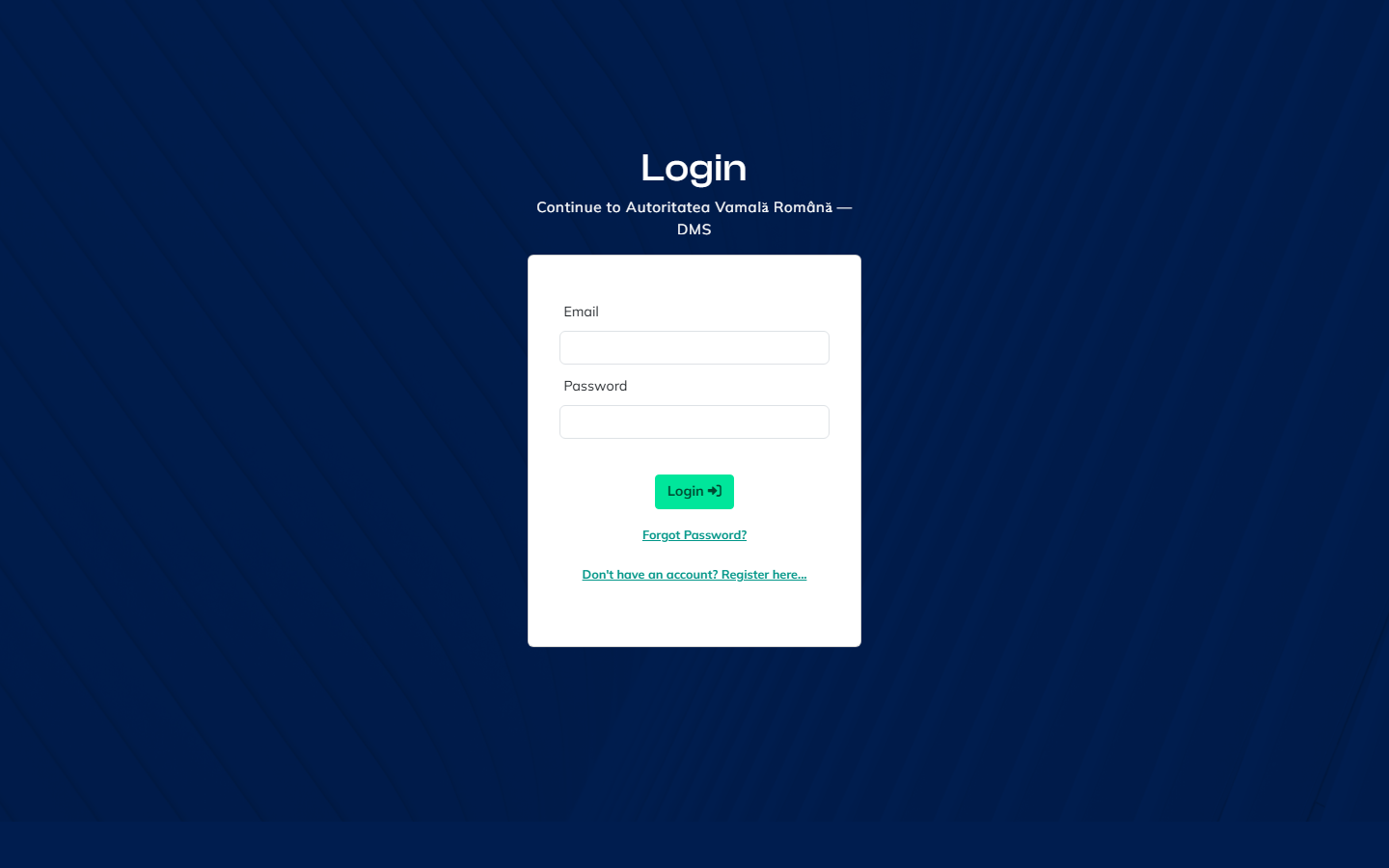
Users sign in with their email and password, and can reset their password with Forgot Password? or in Profile & preferences. A second factor and single sign-on come from an OpenID Connect identity provider. See Extending the DMS. Every sign-in is written to the platform event log, in Configuration > Logs, with the user, time and IP address. The session lasts 60 minutes by default.
Home
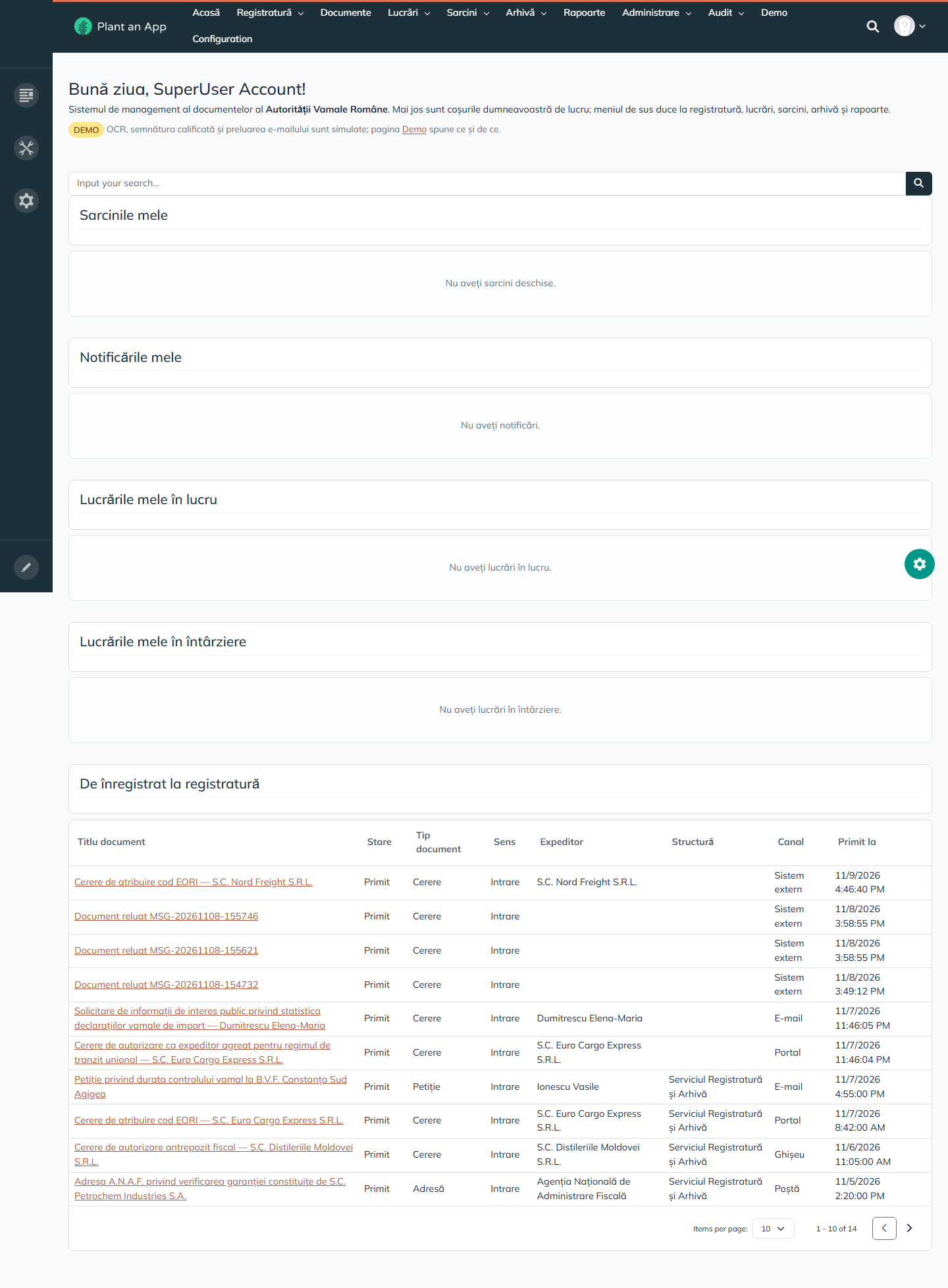
Acasă shows the signed-in user's baskets:
| Basket | What's in it |
|---|---|
| Sarcinile mele | My open tasks. |
| Notificările mele | My notifications. |
| Lucrările mele în lucru | My cases in progress. |
| Lucrările mele în întârziere | My overdue cases. |
| De înregistrat la registratură | Documents waiting to be registered. |
Registry
| Page | What it does |
|---|---|
| De înregistrat | Two grids: documents received but not yet classified, and indexed documents waiting to be registered. Columns include title, status, type, direction, sender, structure, channel, date received, OCR status, external number and proposed register. Row actions: OCR, Triază (triage) and Triază din nou. |
| Registre | All register entries, with number, register, year, date, direction, document, subject, counterparty, who registered it and status. An entry can be rectified, with a new subject, external number or structure and a mandatory reason, or cancelled, with a mandatory reason and optionally cancelling the document too. Entries are never renumbered. |
| Corespondență de ieșire | Outgoing documents, with registration number, recipient, dispatch channel, register, signature status and dispatch result. |
Registers are set up per institution. For example:
| Register | Code | Direction | Numbering | Prefix | Restarts every year |
|---|---|---|---|---|---|
| Registrul general de intrare | RGI | Incoming | Institution-wide | IN/ | Yes |
| Registrul general de ieșire | RGE | Outgoing | Institution-wide | OUT/ | Yes |
| Registrul de corespondență internă | RCI | Internal | Institution-wide | INT/ | Yes |
| Registrul special al autorizațiilor | RSA | Outgoing | Per structure | AUT/ | Yes |
| Registrul de petiții și sesizări | RPT | Incoming | Institution-wide | PET/ | Yes |
Registration numbers look like IN/1427/2026.
Documents arrive through a channel: Poștă (post), Curier (courier), E-mail, Portal, Ghișeu (front desk), Scanare (scanning), Intern (internal) or Sistem extern (external system).
Documents
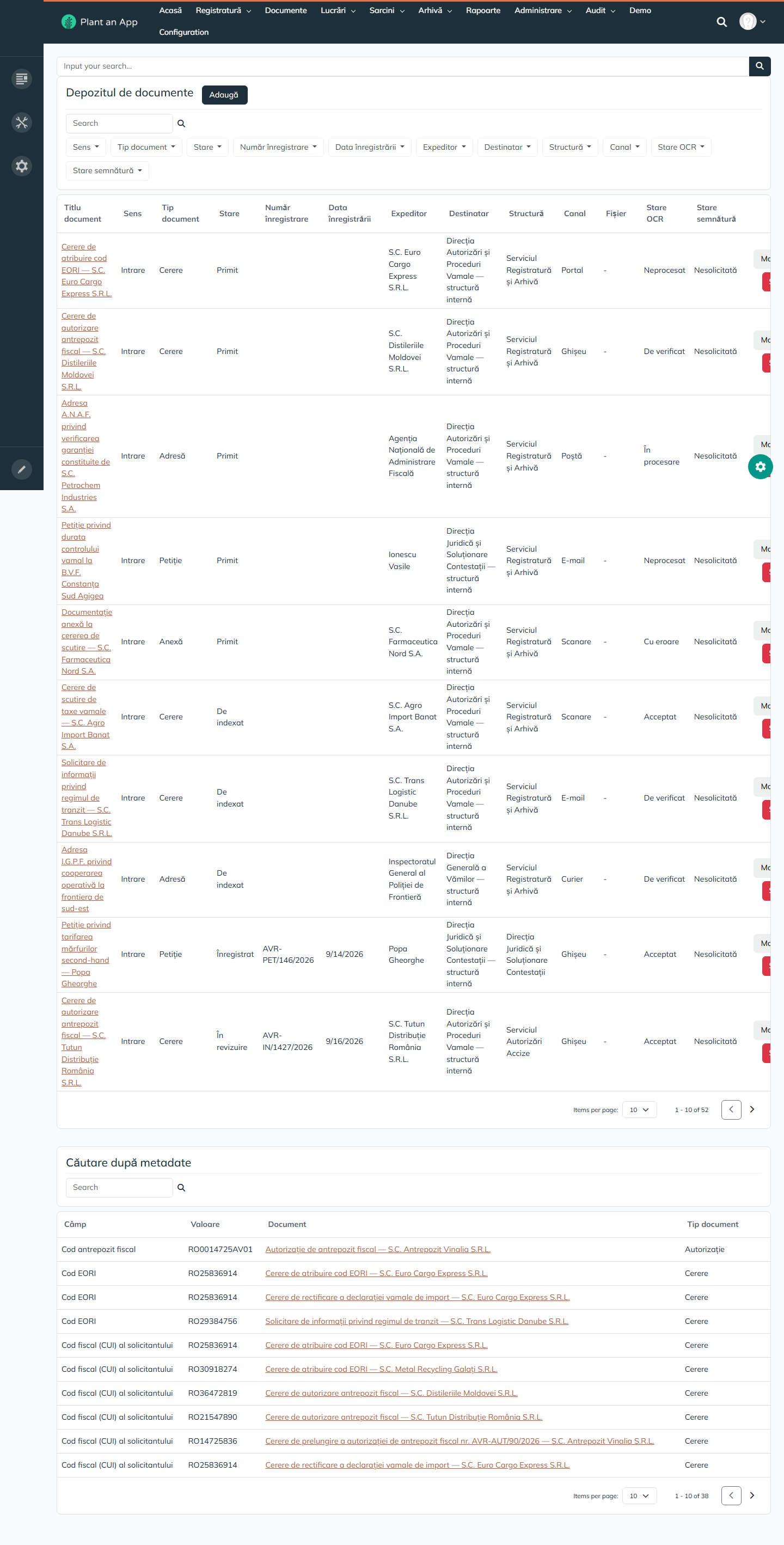
- Depozitul de documente is the central repository. You can filter it by direction, type, status, registration number and date, sender, recipient, structure, channel, OCR status and signature status, and add, edit or delete documents.
- Căutare după metadate searches the type-specific metadata values, such as an EORI code, a tax ID (CUI) or a bonded warehouse code.
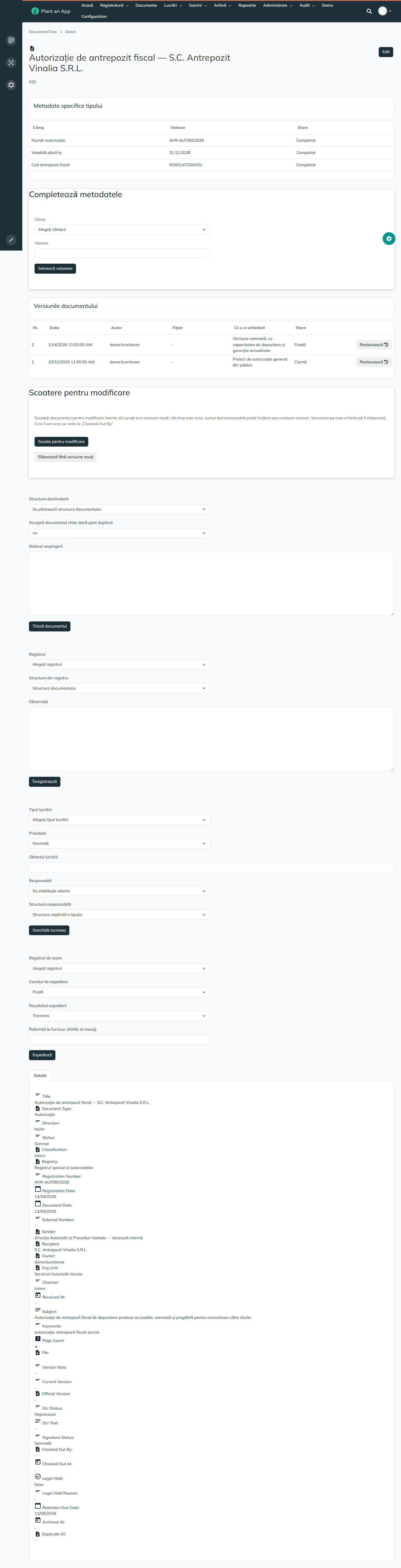
The document page has these sections:
| Section | What it does |
|---|---|
| Type-specific metadata | The fields defined for the document's type, each marked Completat or Necompletat. Values are checked against the field's type: number, date (dd.mm.yyyy), list value or yes/no. |
| Versions | The numbered versions, with date, author, file, change note, status (Draft or Final) and whether the version is the official one. Restaurează restores a version by creating a new one, so history is never rewritten. The signed version stays the official one. |
| Check-out | Scoate pentru modificare locks the document, so only that user can upload or restore versions. Eliberează fără versiune nouă releases it, and uploading a new version releases it too. The holder shows in Checked Out By. |
| Triage | Choose the destination structure, accept a probable duplicate, or reject the document with a reason. |
| Register | Choose the register and the structure, and add notes. |
| Open case | Create a case from the document: case type, priority, subject, responsible person and structure. |
| Dispatch | The outgoing register, dispatch channel, result (sent or failed) and the provider's reference, such as an AWB or a message ID. |
| Details | All the document's fields, including OCR text, signature status, legal hold and retention date. |
A document goes through these statuses: Primit, De indexat, Înregistrat, În revizuire, Semnat, Transmis, Arhivat, or Anulat if it's cancelled. Its OCR status is Neprocesat, În procesare, De verificat, Acceptat or Cu eroare.
Cases
| Page | What it shows |
|---|---|
| Lucrări | All cases, filtered by status, type, priority, requester, responsible user and structure, opening date and due date. |
| Lucrările mele | Open cases assigned to me. |
| Lucrările structurii | Cases of the structures I head. |
| Nealocate | Cases with no responsible person. |
| În întârziere | Cases past their due date. |
Case numbers are built from the classification code, the structure code, the year and a counter, for example II.A.3-SAA-2026-0003. A case is Nou, În lucru, În așteptare, În avizare, Soluționat, Închis or Arhivat.
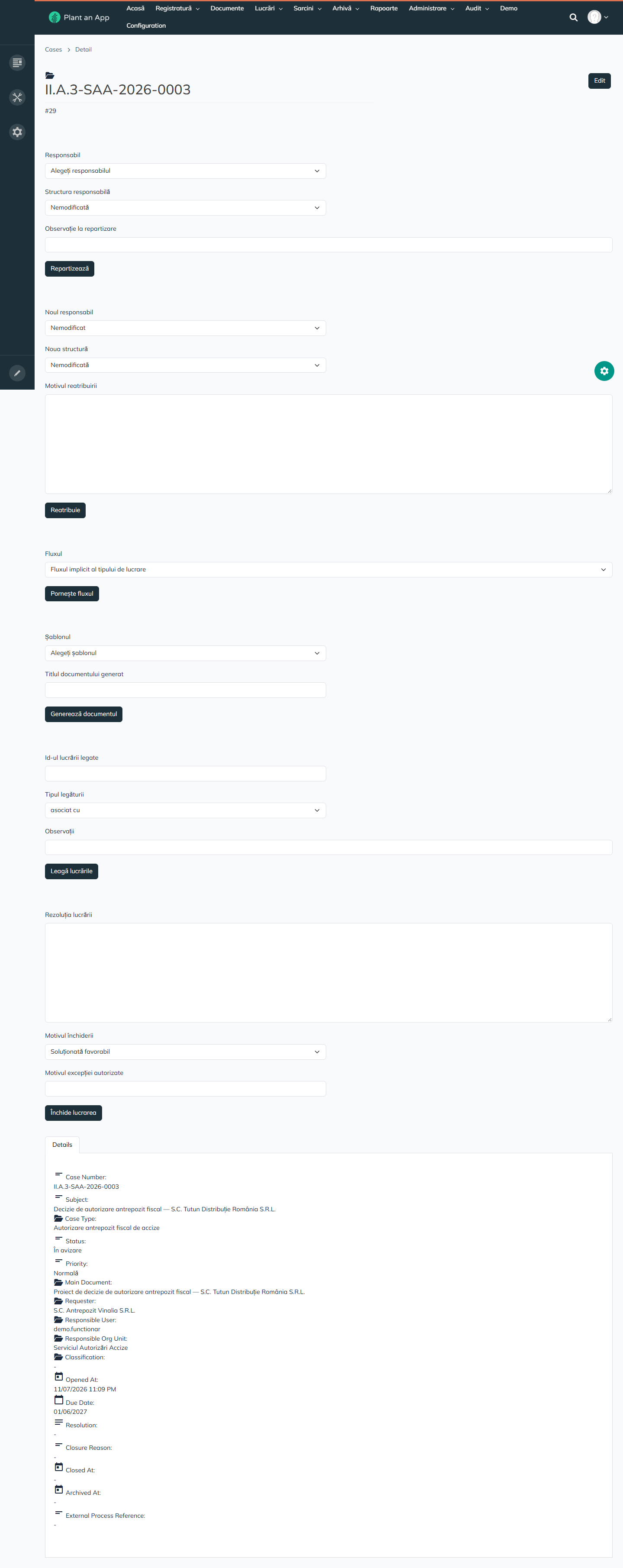
| Action on the case page | What it does |
|---|---|
| Repartizează | Assigns a responsible user or structure, with a note. |
| Reatribuie | Reassigns the case. A reason is mandatory, and both the old and the new holder are notified. |
| Pornește fluxul | Starts the case type's default flow, or a chosen one. |
| Generează documentul | Generates a document from a template, with a title. |
| Leagă lucrările | Links the case to another one: continuation of, reply to, associated with, or completion for. |
| Închide lucrarea | Closes the case with a resolution and a reason: Soluționată favorabil, Soluționată cu măsuri, Respinsă motivat or Clasată. |
A case can't be closed while it has no main document, a mandatory task is open, a required outgoing document is missing, or no resolution is given. An authorized exception, with a mandatory reason, overrides these checks.
Case types are set up per institution. For example:
| Case type | Classification code | Default structure | Days to due date | Needs an outgoing document | Retention | Default flow |
|---|---|---|---|---|---|---|
| Autorizare antrepozit fiscal de accize | II.A.3 | SAA | 60 | Yes | 10 years | Autorizare accize |
| Atribuire cod EORI | II.B.1 | SEORI | 10 | Yes | 10 years | Avizare document de ieșire |
| Scutire de taxe vamale | III.C.2 | DAPV | 30 | Yes | 10 years | Avizare document de ieșire |
| Soluționare petiție | I.D.1 | DJSC | 30 | Yes | 3 years | Soluționare petiție |
| Corespondență internă | I.A.5 | DGV | 15 | No | 5 years | Consultare internă |
| Control ulterior | IV.A.1 | DSCV | 90 | Yes | 30 years | Avizare document de ieșire |
| Autorizare regim vamal special | II.A.7 | DAPV | 45 | Yes | 10 years | Autorizare accize |
Tasks
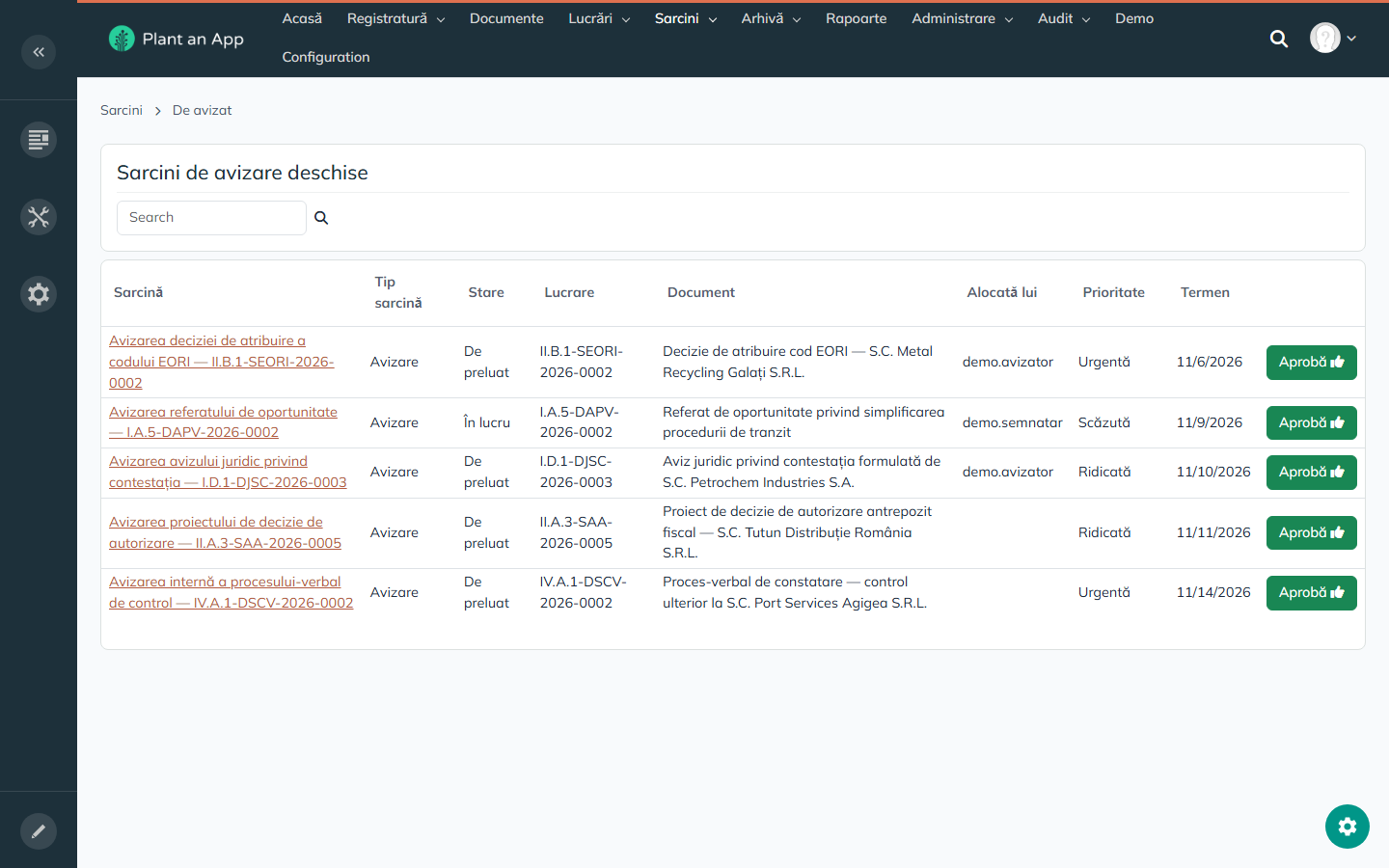
| Page | What it shows |
|---|---|
| Sarcini | All tasks, with type, status, case, document, assignee, priority, due date and outcome. |
| De avizat | Open approval tasks, with a one-click Aprobă button. |
| De semnat | Open signing tasks, with a one-click Semnează button. |
| Sarcinile mele | My tasks and the tasks delegated to me. |
On the task page, the assignee chooses Aprobă, Returnează, Respinge or Semnează, with a justification. Returning and rejecting need one. A task is De preluat, În lucru, Finalizată, Returnată, Respinsă or Anulată. Task types include Verificare, Avizare, Semnare, Transmitere, Repartizare, Analiză, Redactare, Aprobare, Decizie, Consultare, Înregistrare and Arhivare.
Archive
- De arhivat lists closed cases not yet archived, with an Arhivează button. Archiving stamps the case and its documents, and computes each document's retention date from the retention rule. It's refused if a document is under legal hold. Documents shared with a case that's still open are skipped until that case closes.
- Termene de păstrare lists documents with a retention date, the legal hold flag and its reason, such as a court case that blocks destruction, and a Revizuiește termenele button.
Retention rules come from the institution's archival schedule. For example:
| Rule | Code | Applies to | Starts at | Years | Legal basis | Destruction restricted |
|---|---|---|---|---|---|---|
| Păstrare permanentă — acte administrative | RET-P | Document | Case closure | 100 | Legea 16/1996 art. 7, 13 | Yes |
| Retenție 10 ani — autorizații și decizii | RET-10 | Document | Authorization expiry | 10 | Reg. (UE) 952/2013 art. 51(1) | No |
| Retenție 5 ani — corespondență curentă | RET-5 | Document | Case closure | 5 | Archival nomenclature, pos. 12 | No |
| Retenție 3 ani — petiții și sesizări | RET-3 | Document | Petition resolution | 3 | O.G. 27/2002 art. 13 | No |
| Retenție 30 ani — dosare de control ulterior | RET-30 | File | Case closure | 30 | Legea 16/1996 art. 13(2); Legea 207/2015 art. 25 | No |
The daily retention job only flags documents for the archivist to review, with an audit event and a notification. It never deletes anything.
Reports
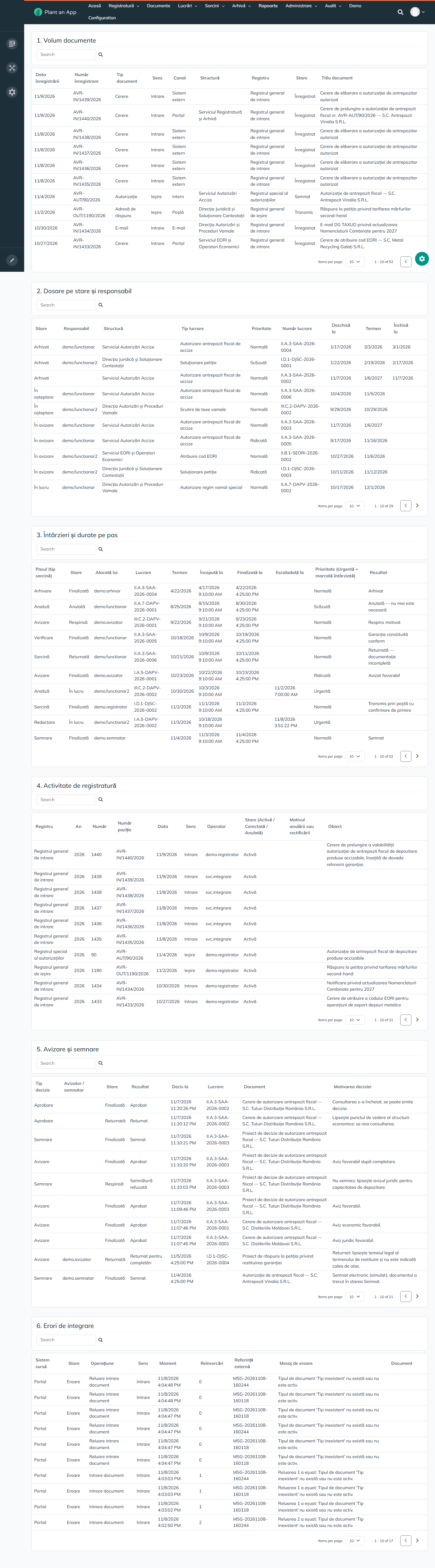
Rapoarte has six predefined reports, as tables with sortable columns and paging:
| Report | What it shows |
|---|---|
| Volum documente | Document volume by date, number, type, direction, channel, structure, register and status. |
| Dosare pe stare și responsabil | Cases by status and responsible person. |
| Întârzieri și durate pe pas | Delays and durations per flow step: started, completed, escalated, outcome. |
| Activitate de registratură | Registry activity: active, corrected and cancelled entries. |
| Avizare și semnare | Approval and signing decisions, by reviewer and signer. |
| Erori de integrare | Integration errors. |
Reports have no charts and no export, and users can't build their own. Administration grids have an Export Excel button.
Administration
Every nomenclature is maintained on a screen, without code:
| Page | What it holds |
|---|---|
| Tipuri de documente | 11 document types (Cerere, Adresă de răspuns, Anexă, Adresă, Referat, Aviz, Decizie, Autorizație, E-mail, Proces-verbal, Petiție), each with a code, category, default register, classification level, retention rule and flow, and whether it must be signed. A second grid defines the metadata fields of each type: 13 fields for Cerere, Petiție, Proces-verbal, Decizie and Autorizație, of type Text, List, Number or Date, each with a mandatory flag, an order, a help text and an active flag. Adding or changing a field updates the existing documents. |
| Tipuri de lucrări | The 7 case types. See Cases. |
| Registre | The 5 registers, with their next number and current year. See Registry. |
| Fluxuri | The approval flows. See Approval Flows. |
| Șabloane | 4 templates: Adresă de răspuns către solicitant (TPL-ADR 1.2), Decizie de autorizare antrepozit fiscal (TPL-DEC 2.0), Referat de specialitate (TPL-REF 1.0) and Invitație la completarea documentației (TPL-INV 1.1). They produce HTML, with placeholders such as [Case:CaseNumber], [Party:Name], [DocumentFile:RegistrationNumber], [OrgUnit:Name], [User:DisplayName] and [Today]. Generation stops if a placeholder in the template has no value. |
| Structuri organizatorice | The 12 structures. See Organizational Structures. |
| Reguli de păstrare | The 5 retention rules. See Archive. |
| Niveluri de clasificare | Public (1), Intern (2) and Confidențial (3), described with reference to Legea 544/2001 and need-to-know access. |
| Parteneri | Parties (people, companies and institutions), each with a tax ID (CUI) or personal number (CNP), email, phone, locality and county. |
| Delegări | Delegations: holder, delegate, period, structure, scope (Tasks, Approval, Case handling or All tasks) and reason. A delegation is Programată, Activă, Expirată or Revocată. Delegations expire on their own and can be revoked early. |
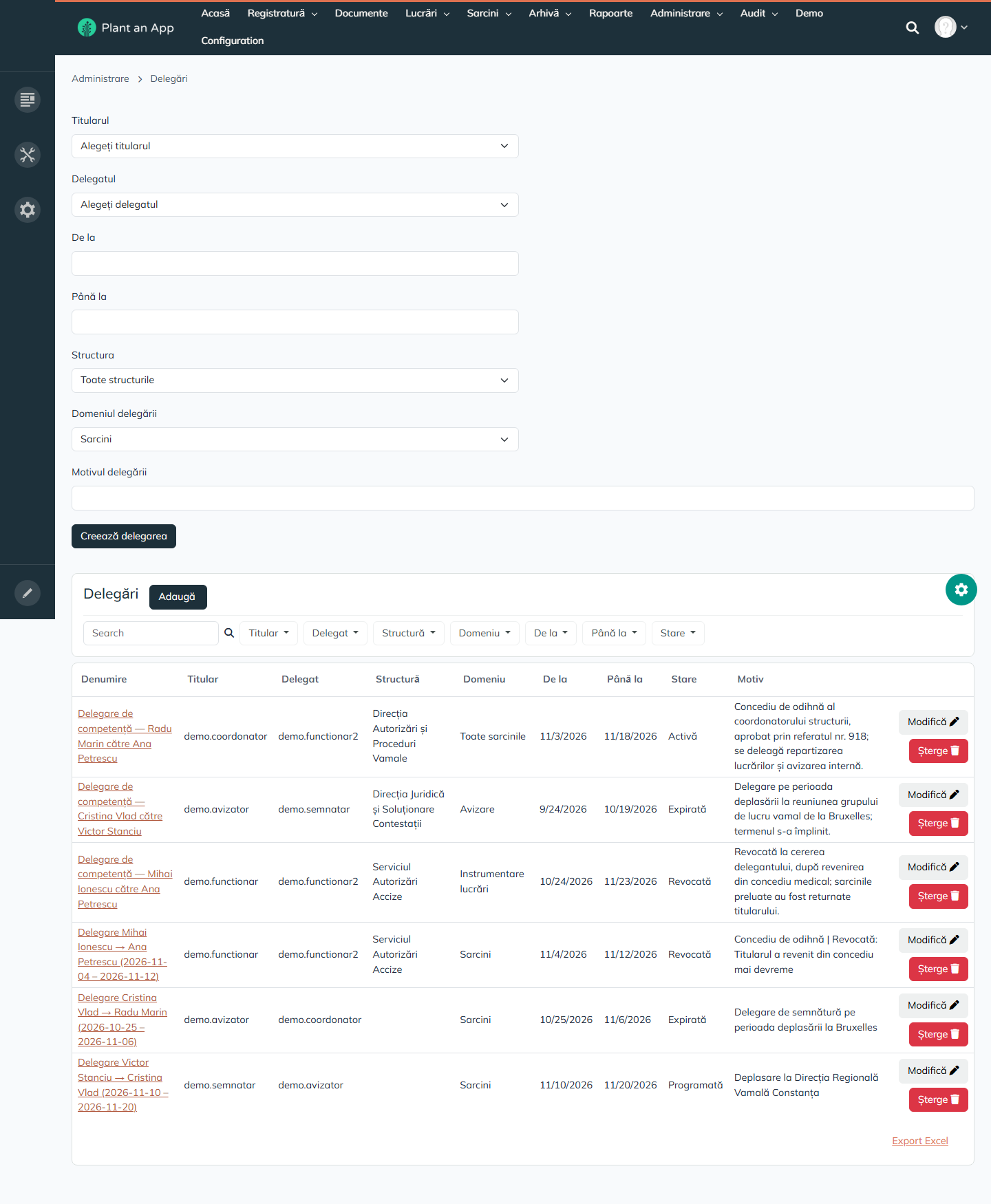
The Administrare page also has a Reindexează căutarea button that rebuilds the full-text index.
Audit
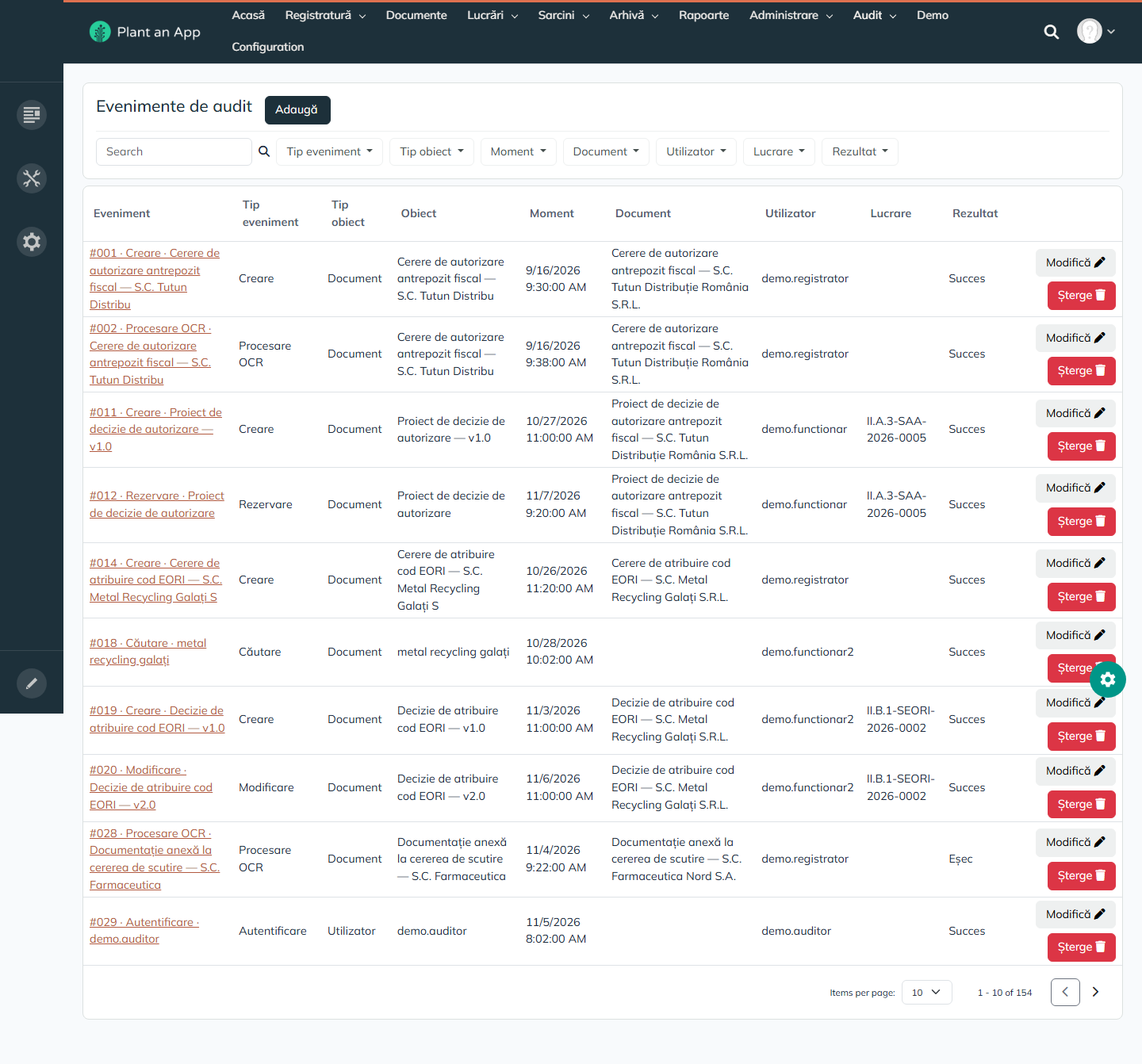
- Evenimente de audit lists the audit events. Event types include Creare, Modificare, Procesare OCR, Rezervare (check-out), Căutare, Autentificare, status changes, assignments and dispatch. Each event records the user, time, object, linked document or case, result (Succes, Eșec or Excepție), IP address and details.
- Jurnal de integrare has every integration message, with system, direction, operation, status, external reference, linked document, retry count, error message, and the full request and response.
- Operațiuni cu erori lists failed integration operations, with a Reia operațiunile eșuate (retry) button.
Search
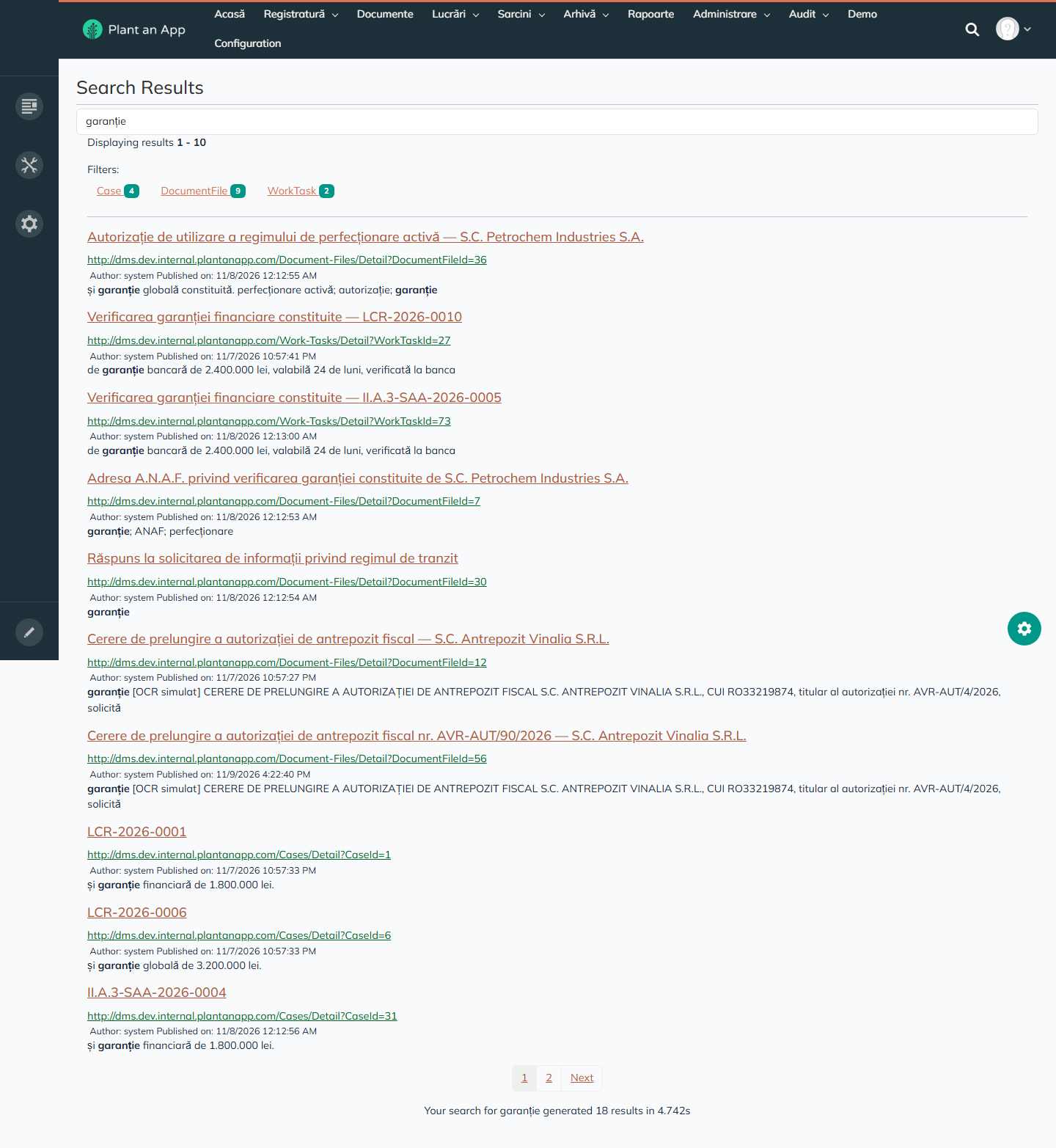
Full-text search covers documents, including their OCR text, cases, tasks, register entries, metadata values, parties and templates. Results show snippets and can be filtered by object type, for example Case 4, DocumentFile 5, RegistryEntry 1, MetadataValue 5, Party 1 for "tutun". The index is rebuilt every night and on demand. See Search.
How search behaves:
| You search for | Results | What it shows |
|---|---|---|
antrepozit | 51 | A single word works. |
antrepozit tutun | 15 | With several words, all of them must match. |
"garanție bancară" | 4 | A phrase in quotes finds the exact phrase. |
RO21547890, IN/1427/2026 | 1, 3 | Identifiers, such as tax IDs and registration numbers, are found as written. |
Search matches whole words: AND, OR and - are read as ordinary words, and wildcards such as antrep* aren't used.
A search takes 0.02–0.04 s once warm. The first search after a pause took 4.7 s.
Configuration
Super users have the Plant an App administration area, Configuration: Dashboard, General settings, Roles, Users, Pages, Files, SQL Console, Entities, Connectors, Workflows, APIs, Automation, Tokens, User Guides, Search, Updates, Logs and Version Control. That's where entities, server workflows, APIs and scheduled jobs are built and changed, without deploying code.
Phone Layout
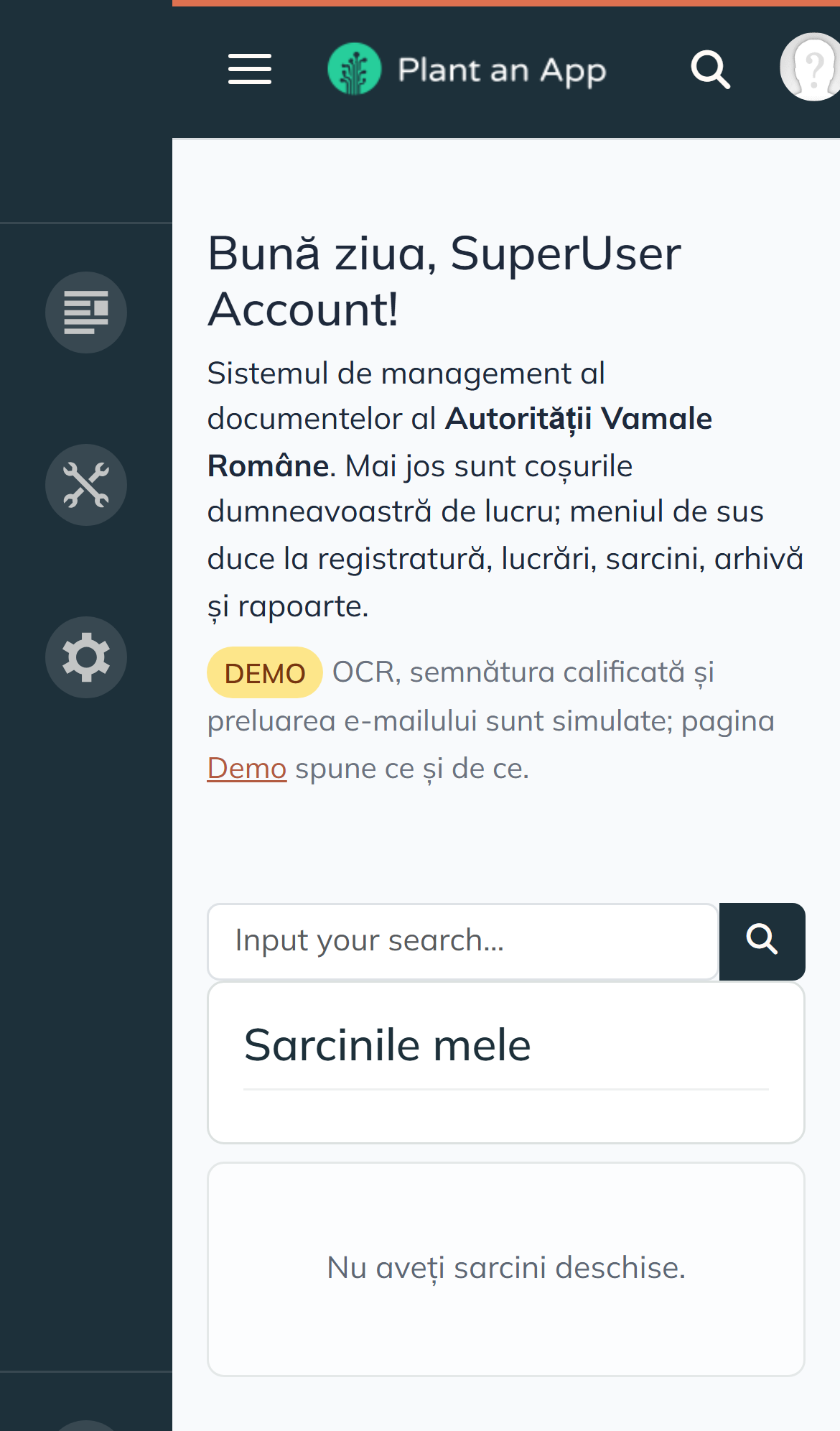
On a phone-sized screen, the top menu collapses into a menu button, forms stack vertically and text stays readable. The editing side bar shows only to platform administrators. Users can also work in the Plant an App mobile app.
Processes
Incoming Correspondence
- Intake. A document arrives at the front desk, by scanning, post, email, the portal or another application. Other systems call
POST /api/dms/documents/intake. Intake finds the party, checks for duplicates, first by external number and then by sender, subject and date, creates the document and writes the integration log. It can also register the document right away. Sending the same external reference again never creates a second document or number. - OCR. The OCR step fills in the OCR text, page count and OCR status, from the OCR engine connected to it. See Connected Services.
- Triage (Triază). The mandatory metadata is checked, possible duplicates are flagged, and the destination structure is set. The document moves from Primit to De indexat. A file that can't be used can be rejected, with a reason.
- Registration (Înregistrează). The next number is taken from the chosen register in a single step, so two documents never get the same number. The number, date and register are written on the document, and a register entry and an audit event are created. Registration is refused while mandatory metadata is missing.
- Opening a case (Deschide lucrarea). The subject, requester, classification and structure come from the document, the case number is generated, and the due date comes from the case type. The document becomes the case's main document and moves to În revizuire.
Case Handling and Approval
- The coordinator assigns the case, or it waits in Nealocate. A reassignment needs a reason.
- The officer starts the flow. The first step's tasks are created for the step's user or role and appear in their baskets.
- Each participant decides: Aprobă, Returnează, Respinge or Semnează. Return goes back one step and reject goes back to the first step. Both need a justification.
- Parallel steps, which share an order number, create one task each. If they're all mandatory, all of them must finish. If none is mandatory, the first one to finish completes the group and the others are cancelled.
- The officer generates the outgoing document from a template. Its versions are kept, and it's checked out while it's edited.
- The signer signs. The signature is recorded on the document, and the signed version becomes the official one. See Connected Services. A refusal must be justified and doesn't complete the task.
- The registry dispatches the outgoing document, with a number from the outgoing register, a channel and a result. Dispatch is refused until approval and signing are complete. Delivery providers can confirm delivery through
POST /api/dms/dispatch/callback. - The officer closes the case with a resolution and a reason.
Archiving and Retention
- Closed cases appear in De arhivat, where the archivist archives them.
- Each document's retention date is computed from the case type's retention rule.
- A legal hold blocks archiving and destruction.
- Every night, the retention job flags documents whose retention date has passed, for the archivist to review.
Deadlines, Escalation and Delegation
| Job | Time | What it does |
|---|---|---|
| Daily Task Deadlines | 05:30 | Notifies the holders of tasks that are nearly due, and raises overdue tasks to priority Urgentă. At most one notification per task, type and day. |
| Daily Task Escalation | 05:45 | Escalates each overdue task once, to the head of the task's structure, or of the case's structure. |
| Daily Delegation Expiry | 03:10 | Starts scheduled delegations and ends expired ones, with an audit event. |
Delegation doesn't widen the delegate's rights. Tasks stay assigned to the holder and appear in the delegate's basket, and the platform still checks the delegate's own permissions.
Petitions
Petitions use the same features:
- a case type, Soluționare petiție, with classification code I.D.1;
- their own register, Registrul de petiții și sesizări (PET/);
- a 30-day default deadline;
- their own metadata: petitioner type and legal response deadline;
- their own flow: assignment, analysis, drafting the reply, approval;
- a 3-year retention rule, based on O.G. 27/2002.
A petition can be closed as Clasată (filed). Misdirected correspondence can be forwarded with an outgoing Adresă de înaintare.
Approval Flows
Approval flows are data. A flow definition has a code, a version, a status and a start date, and an ordered list of steps. Each step has a role, a number of days, and says whether it's mandatory and whether the reviewer can reject or return. A new version is a new definition with the same code. Running cases continue on the version they started with: for example, Avizare document de ieșire version 1 is Înlocuit and version 2 is Activ.
Avizare document de ieșire
Approving an outgoing document (AVIZ-IESIRE, version 2):
| Order | Step | Role | Days | Can reject | Can return |
|---|---|---|---|---|---|
| 1 | Verificare document de ieșire | Funcționar | 2 | No | Yes |
| 2 | Avizare document de ieșire | Avizator | 3 | Yes | Yes |
| 3 | Semnare document de ieșire | Semnatar | 2 | Yes | Yes |
| 4 | Transmitere document de ieșire | Registrator | 1 | No | No |
Soluționare petiție
Answering a petition (PETITIE, version 1):
| Order | Step | Role | Days | Can reject | Can return |
|---|---|---|---|---|---|
| 1 | Repartizare petiție | Coordonator | 1 | No | No |
| 2 | Analiza petiției | Funcționar | 10 | No | Yes |
| 3 | Redactare răspuns la petiție | Funcționar | 5 | No | Yes |
| 4 | Aprobare răspuns la petiție | Coordonator | 3 | Yes | Yes |
Autorizare accize
An excise authorization, with two mandatory approvals in parallel (ACCIZE, version 1):
| Order | Step | Role | Days | Can reject | Can return |
|---|---|---|---|---|---|
| 1 | Verificare documentație accize | Funcționar | 3 | Yes | Yes |
| 2 | Aviz juridic accize | Avizator | 5 | Yes | Yes |
| 2 | Aviz economic accize | Coordonator | 5 | Yes | Yes |
| 3 | Decizie de autorizare accize | Semnatar | 3 | Yes | Yes |
Consultare internă
An internal consultation, with two optional consultations in parallel, where the first answer is enough (CONSULTARE, version 1):
| Order | Step | Role | Days | Mandatory |
|---|---|---|---|---|
| 1 | Inițiere consultare internă | Funcționar | 1 | Yes |
| 2 | Consultare structura juridică | Avizator | 4 | No |
| 2 | Consultare structura economică | Coordonator | 4 | No |
| 3 | Concluzia consultării | Coordonator | 2 | Yes |
Server Workflows and Automation
Server Workflows
The DMS logic is in about 50 server workflows in Configuration > Workflows, in the DMS namespace: intake and registry, documents and versions, cases, flows and tasks, deadlines, delegation and retention, audit, notifications and search.
Automation Jobs
The Automation jobs are in Configuration > Automation:
| Job | Runs when | What it does |
|---|---|---|
| On Document Status Change, On Case Status Change, On Work Task Status Change | A status changes. | Writes an audit event. |
| On Document File Upload | A file is uploaded. | Creates a new version. |
| On Document Type Set, On Metadata Field Change | A document gets a type, or a metadata field changes. | Adds or applies the type's metadata fields. |
| Daily Task Deadlines | 05:30 | See Deadlines, Escalation and Delegation. |
| Daily Task Escalation | 05:45 | Same. |
| Daily Delegation Expiry | 03:10 | Same. |
| Retry Integration Errors | 03:30 | Retries failed integration messages. |
| Daily Retention Review | 04:20 | Flags documents whose retention date has passed. |
| Reindexare nocturnă | Nightly | Rebuilds the search index. |
| Roll Registries To New Year | Yearly | Restarts register numbering. |
Integration API
The APIs are in Configuration > APIs. See APIs.
DMS Endpoints
| Method | URL | What it does |
|---|---|---|
| POST | /api/dms/documents/intake | Receives a document from the portal, the email flow or another application, and can register it. Calls with the same external reference return the same document. Returns the status, document ID, registration number and the ID of a duplicate, if one was found. |
| POST | /api/dms/documents/attachment | Adds a new version to an existing document. The reference application records the version's metadata; storing the file content from the API is set up per installation. |
| GET | /api/dms/cases/status | Returns a case's number, status, due date, resolution and the main document's registration number, by case number, ID or external reference. |
| POST | /api/dms/dispatch/callback | Records the delivery result from post, courier, email or the portal. |
Besides these, the platform generates POST, GET, PUT and DELETE endpoints for each of the 24 DMS entities, such as GET /api/Cases and GET /api/FlowSteps?RowLimit=200. They follow the platform's role permissions, without code, and return JSON.
An intake request, from the integration log:
{
  "Title": "Cerere de autorizare ca expeditor agreat pentru regimul de tranzit unional — S.C. Euro Cargo Express S.R.L.",
  "DocumentTypeName": "Cerere",
  "RegistryCode": "",
  "ExternalNumber": "PT-2026-58120",
  "DocumentDate": "2026-11-03",
  "SubjectText": "Cerere de acordare a statutului de expeditor agreat …",
  "Keywords": "tranzit unional; expeditor agreat; garanție globală",
  "Channel": "Portal",
  "PartyName": "S.C. Euro Cargo Express S.R.L.",
  "PartyIdentifier": "RO29184736",
  "PartyEmail": "vama@eurocargo.example"
}
Its response is {"status":"Creat","documentFileId":"57","registrationNumber":"","duplicateOf":""}.
A case status response, for GET /api/dms/cases/status?CaseNumber=II.A.3-SAA-2026-0003, which answered in 74–182 ms:
{
  "Found": "da",
  "CaseIdOut": "29",
  "CaseNumberOut": "II.A.3-SAA-2026-0003",
  "Status": "În avizare",
  "Subject": "Decizie de autorizare antrepozit fiscal — S.C. Tutun Distribuție România S.R.L.",
  "DueDate": "1/6/2027 12:00:00 AM",
  "Resolution": "",
  "ClosedAt": "",
  "RegistrationNumber": "",
  "HttpStatus": "200",
  "Error": ""
}
How the API Behaves
| Check | Result |
|---|---|
| A call without a session, from another domain | HTTP 400, "Current domain is not allowed by this API method". |
| A call without a session, from the same domain | HTTP 401, "Current request is not authorized to invoke method …". |
| A signed-in read of an entity endpoint | HTTP 200 in 37–55 ms. The RowLimit parameter is mandatory. |
| Response format | JSON only, no XML. |
| Versions | The URLs have no version number. |
| Repeated intake | The same external reference returns HTTP 200 with the same document. |
| Refused calls | Each refused call without a session is written to the platform event log as a "General Exception", which fills the log. |
Security and Performance
| Area | How the DMS handles it |
|---|---|
| HTTPS | http:// redirects to HTTPS. TLS 1.3 and TLS 1.2 are offered; TLS 1.0, TLS 1.1 and SSL are refused. See Settings for Production. |
| Response headers | X-Frame-Options: SAMEORIGIN and X-XSS-Protection. HSTS and a Content-Security-Policy are set for production. |
| Folders and unknown addresses | /Portals/ isn't listed, and unknown addresses return a 404 page. |
| Access without signing in | Pages redirect to the sign-in page, and APIs return 401. |
| Sign-in | Email and password, or single sign-on through an OpenID Connect identity provider, which also adds the second factor. Passkeys are optional. |
| Account lockout | ASP.NET membership locks an account after failed attempts: 5 in 10 minutes by default, set in web.config. |
| Sign-in logging | Every sign-in is in the platform event log, with the user and IP address, in Configuration > Logs. |
| Cookies | Cookies, including the authentication cookie .DOTNETNUKE, are HttpOnly and SameSite=Lax; production adds the Secure flag. |
| Database | Microsoft SQL Server, one database for DNN, the platform and the DMS. |
Page load times on a desktop, for reading:
| Page | Server response | DOM ready | Load event | All requests finished |
|---|---|---|---|---|
| Home | 146 ms | 1.10 s | 1.13 s | 2.32 s |
| Documents | 105 ms | 0.47 s | 0.64 s | 1.50 s |
| Reports | 125 ms | 0.32 s | 0.63 s | 1.46 s |
| Document detail | 158 ms | 0.40 s | 0.41 s | 1.57 s |
| Case detail | 177 ms | 0.42 s | 0.43 s | 1.53 s |
| Tasks to approve | 165 ms | 0.40 s | 0.84 s | 2.17 s |
| Audit | 170 ms | 0.53 s | 1.02 s | 1.94 s |
| Delegations | 110 ms | 0.37 s | 0.40 s | 1.40 s |
Every page can be used well within 2 seconds. The last background requests on the busiest pages finish at 2.2–2.3 s. The cases/status API answers in under 0.2 s.
Accessibility. There's a "Skip to main content" link, and grid headers are buttons with labels. Mark the pages with their content language (lang="ro"). See Accessibility.
Language. The interface is in Romanian, with correct diacritics. Some platform labels on detail pages and controls, such as "Edit", "Details" and "Items per page", are translated per installation. See Languages.
Extending the DMS
The DMS is built only from platform features, so it grows the same way: by adding add-ons, connectors and workflows, without code.
Next Steps by Area
| Area | In the DMS today | To take it further |
|---|---|---|
| OCR and capture | OCR is a step of intake, with its own statuses (Neprocesat to Acceptat), and fills in the text and page count. The Scanare channel is ready for scanned documents. | Connect an OCR engine to the OCR step, so it reads the scanned file instead of composing the text. Add barcodes with the Barcode Generator add-on. |
| Signing | Signing is a step of every outgoing flow. It records the signer, time and outcome, and the signed version becomes the official one. | Sign PDFs with the user's own token with the PDF AutoSigner add-on, or connect an accredited signature provider. |
| Document generation | HTML templates with placeholders for the case, party, document, structure and user, generated from the case page. | Fill in Word templates with the Word add-on, and produce PDF files with the PDF Generator add-on. |
| Email intake | The intake API files documents from any channel, checks for duplicates, and never files the same reference twice. | File messages from a mailbox with the platform's IMAP and POP3 triggers, which pass the attachments to the intake workflow. |
| Notifications | In-app notifications on assignment, reassignment, deadlines, escalation and delegation, each with a link to the right basket. Notifications already have an E-mail channel. | Send them by email through the Default SMTP connector, which is already set up. |
| Sign-in | Email and password, password reset, and account lockout after failed attempts. | Sign in with Active Directory or LDAP accounts, with groups mapped to roles, with the Active Directory add-on or OpenLDAP. Add a second factor through an OpenID Connect identity provider. |
| Approval flows | Four versioned flows with sequential and parallel steps, deadlines, return and reject, maintained in Administrare > Fluxuri. | Draw processes as diagrams with BPMN 2.0 workflows, with user tasks for the people in them. |
| Tasks | One list per user, with delegated tasks, due dates, in-app reminders and escalation to the head of the structure. | Use Built-in Tasks and My Tasks, which add email notifications and escalation steps. |
| Audit | Every business action, with the user, time, object and result. Status and assignment changes show the old and new value. | Turn on Record History on the DMS entities, to record the old and new value of every field. |
| Permissions | Role permissions per entity, with separate view, add, edit and delete rights, and classification levels on documents. | Give records an owner with Record Owners and Can Read. Add more classification levels on the same screen. |
| Reports | Six reports on volumes, cases, durations per step, registry activity, decisions and integration errors. Administration grids export to Excel. | Create Excel files from any list or query with the Excel add-on, and add dashboards for managers. |
| Mobile | A responsive layout that works on phones. | Connect phones with the Plant an App mobile app, add an approve and reject list for tasks, and send push notifications. |
| Languages | A Romanian interface with correct diacritics. | Translate the remaining platform labels, and mark the pages as Romanian (lang="ro"). |
Settings for Production
Before going live, set up the web server and the site for production:
- Turn on HSTS (
Strict-Transport-Security: max-age=31536000; includeSubDomains). - Hide the server version (
server_tokens off;in nginx), and add a Content-Security-Policy. - Set the
Secureflag on all cookies, especially the authentication cookie.DOTNETNUKE. - Set the session timeout your security policy asks for. It's 60 minutes by default.
- Turn off public registration on the sign-in page, since the DMS is for internal users.
- Replace the privacy page with the institution's own text, and add a cookie consent banner.
- Make the audit log and the registers append-only for every role, the super user included.
- Audit changes to the nomenclatures, such as document and case types, flows, templates, registers and retention rules, for example with Record History.
- Log refused API calls as warnings, not as "General Exception", so the platform log stays easy to read.
Related Applications
The institution's external portal and its interoperability infrastructure (message bus, container platform, clustering) are delivered as separate applications. The DMS already has the integration contract they connect to. See Integration API.
Page Index
| Area | URL path |
|---|---|
| Sign-in | /paa-login |
| Home | / |
| Registry: to register | /registratura/de-inregistrat |
| Registry: registers | /registratura/registre |
| Registry: outgoing | /registratura/iesiri |
| Documents | /documente |
| Document page | /Document-Files/Detail/DocumentFileId/{id} |
| Cases: all, mine, my structure, unassigned, overdue | /lucrari, /lucrari/ale-mele, /lucrari/structura, /lucrari/nealocate, /lucrari/intarziate |
| Case page | /Cases/Detail?CaseId={id} |
| Tasks: all, to approve, to sign, mine | /sarcini, /sarcini/de-avizat, /sarcini/de-semnat, /sarcini/ale-mele |
| Task page | /Work-Tasks/Detail/WorkTaskId/{id} |
| Archive: to archive, retention | /arhiva/de-arhivat, /arhiva/retentie |
| Reports | /rapoarte |
| Administration | /administrare/tipuri-documente, /tipuri-lucrari, /registre, /fluxuri, /sabloane, /structuri, /reguli-pastrare, /clasificari, /parteneri, /delegari |
| Audit: events, integration log, errors | /audit, /audit/integrari, /audit/erori |
| Search results | /Search-Results?sb-search={term} |
| Platform configuration | /Configuration |
| Profile | /User-Profile |
Glossary
| Romanian | English |
|---|---|
| Registratură | Registry office |
| Registru / poziție de registru | Register / register entry |
| De înregistrat | To be registered |
| Corespondență de ieșire | Outgoing correspondence |
| Lucrare / dosar | Case / file |
| Sarcină | Task |
| Avizare / a aviza | Review and approval / to approve |
| Semnare | Signing |
| Repartizare / reatribuire | Assignment / reassignment |
| Triază | Triage |
| Expediază | Dispatch |
| Scoate pentru modificare / eliberează | Check out / release |
| Termen | Due date |
| Termen de păstrare | Retention period |
| Reținere legală | Legal hold |
| Structură organizatorică | Organizational structure |
| Partener / parte | Party |
| Delegare | Delegation |
| Șablon | Template |
| Flux | Flow |
| Petiție | Petition |
| Clasată | Filed (closed without further action) |
| Excepție autorizată | Authorized exception |
| Jurnal de integrare | Integration log |
| Operațiuni cu erori | Failed operations |
Related Pages
Revised 11/14/2026