Forms 2.0 - Date
caution
This page is preliminary and subject to change as Forms 2.0 continues to be developed.
Use to select just the date (no time). It renders with a calendar icon that opens an interactive calendar for picking the date with the mouse, and the date can also be typed directly into the field.
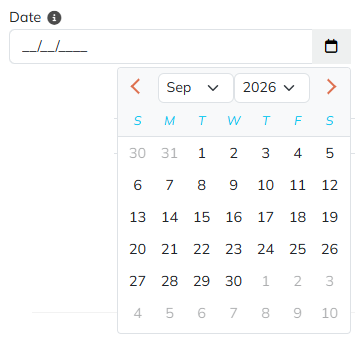
Adding a Date field
Drag the Date tile from the field palette onto the Canvas - see Build for more on adding and arranging fields in general.
Parameters
Only Date-specific parameters are listed below. See Common Field Settings for the settings shared with other field types.
| Field | Description |
|---|---|
| Initial Value | The date to preload. Accepts ISO format (YYYY-MM-DD), locale-formatted dates, or Tokens. Left empty if the value can't be parsed. |
| Minimum Date | The minimum date a user can pick (inclusive). Format YYYY-MM-DD. Supports Tokens. |
| Maximum Date | The maximum date a user can pick (inclusive). Format YYYY-MM-DD. Supports Tokens. |
| Disable Past | When enabled, the date entered cannot be in the past. |
| Disable Future | When enabled, the date entered cannot be in the future. |
| Popup Date Picker | When enabled (the default), a pop-up calendar is available for click-based date selection. When disabled, the date must be typed directly into the field. |
| Root CSS Classes | One or more CSS class names, separated by spaces, applied to the field's root element only. Supports Tokens. |
Common settings that apply to Date
A Date field supports these Common Field Settings:
- General (Label, Name, and Hint)
- Active
- Visibility settings
- Enabled settings
- Field Automations - Value and On Change (Date does not support On Click)
- Field Validators
Tokens
A Date field returns several tokens, referenced using the field's Name - for example, if the field's Name is Birthday:
| Token | Description |
|---|---|
[Birthday] | The stored date value, in ISO format (YYYY-MM-DD). |
[Birthday:Year] | The year. |
[Birthday:Month] | The month number. |
[Birthday:Day] | The day of the month. |
[Birthday:DayOfWeek] | The day-of-week name, in the portal language (for example Monday). |
[Birthday:DayOfYear] | The day of the year (1-366). |
[Birthday:MonthName] | The month name, in the portal language (for example January). |
[Birthday:FormattedDate] | The date formatted using the portal language's short date format (for example 01/23/2026 for en-US). |