Forms 2.0 - Number
This page is preliminary and subject to change as Forms 2.0 continues to be developed.
A field that allows users to enter numeric values. It renders with up and down arrows the user can click to increment or decrement the value, in addition to typing it directly.
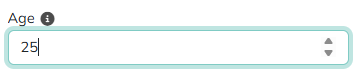
Adding a Number field
Drag the Number tile from the field palette onto the Canvas - see Build for more on adding and arranging fields in general.
Parameters
Only Number-specific parameters are listed below. See Common Field Settings for the settings shared with other field types.
| Field | Description |
|---|---|
| Initial Value | The field loads initially having this value. Supports Tokens, so you can pull data from various sources such as a user profile. |
| Minimum Value | The lowest value allowed. Supports Tokens. |
| Maximum Value | The highest value allowed. Supports Tokens. |
| Root CSS Classes | One or more CSS class names, separated by spaces, applied to the field's root element only. Supports Tokens. |
| Custom Attributes | Name/value pairs inserted as HTML attributes on the field's <input> tag, for use by JavaScript or CSS. Supports Tokens. |
Common settings that apply to Number
A Number field supports these Common Field Settings:
- General (Label, Name, and Hint)
- Active
- Visibility settings
- Enabled settings
- Field Automations - Value and On Change (Number does not support On Click)
- Field Validators
Tokens
A Number field returns its current value as a token, referenced using the field's Name - for example, if the field's Name is Quantity, use [Quantity] elsewhere in the form or its actions to get the number the user entered.