Forms 2.0 - Repeater
This page is preliminary and subject to change as Forms 2.0 continues to be developed.
A container that holds other fields and repeats them for multiple items - for example, letting a user enter several addresses, or several line items, within a single form.
Adding a Repeater
Drag the Repeater tile from the field palette onto the Canvas - see Build for more on adding and arranging fields in general. Once it's on the Canvas, drag other fields into it - these fields make up the template repeated for each entry.
How repeating works
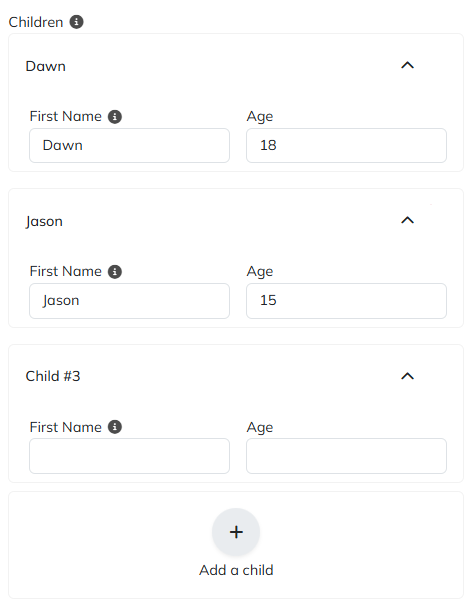
At runtime, the person filling out the form sees one set of the contained fields per entry, under a collapsible header labeled with that entry's Entry Name or Entry Title, plus an Add button (labeled by Add Button Title) to add another entry. Each entry can be removed individually, subject to Minimum Entries. Entries can also be preloaded from an existing list of records using Initial Entries and Initial Entry ID Key - useful for letting a user edit a set of existing records rather than starting from scratch.
Parameters
Only Repeater-specific parameters are listed below. See Common Field Settings for the settings shared with other field types.
| Field | Description |
|---|---|
| Initial Entries | The name of the entity list used to populate the Repeater's initial entries. |
| Initial Entry ID Key | The name of the property that contains each entry's ID, available at submit time to update existing records. Entries without an ID are treated as new. |
| Layout Mode | Vertical and Horizontal arrange each entry's fields automatically. Manual allows free placement and resizing in a mosaic layout. |
| Columns | Only shown in Manual mode. The number of columns in the mosaic layout. |
| Alignment | Only shown in Horizontal mode (Top/Middle/Bottom) or Vertical mode (Left/Center/Right). The alignment of the fields within each entry. |
| Gap | Spacing between fields within each entry - Inherit, Compact, Normal, or Loose. |
| Padding | The padding for the container, in CSS units (for example 8px 0px). |
| Minimum Entries | The fewest entries the user must provide (maximum 100). Leave empty or set to 0 for no minimum. Supports Tokens. |
| Maximum Entries | The most entries the user can add. Defaults to 100. Supports Tokens. |
| Entry Name | The default label for each entry. Supports Tokens. |
| Entry Title | Tokens of fields contained in the entry, used to dynamically update the entry's title as the user fills it in - replacing Entry Name once those fields have data. |
| Add Button Title | The text shown on the button end users click to add another entry. Defaults to Add. Supports Tokens. |
| Root CSS Classes | One or more CSS class names, separated by spaces, applied to the field's root element only. Supports Tokens. |
Common settings that apply to Repeater
A Repeater supports these Common Field Settings:
- General (Label, Name, and Hint)
- Active
- Visibility settings
- Enabled settings
Repeater does not support Field Automations or Field Validators - use Minimum Entries and Maximum Entries above to constrain how many entries are required or allowed.
Tokens
A Repeater returns its entries as tokens, referenced using the field's Name - for example, if the field's Name is Addresses:
| Token | Description |
|---|---|
[Addresses] | A JSON array of all current entries. |
[Addresses:Count] | The number of entries. |
[Addresses:UpdatedEntries:Count] | The number of updated entries. |
[Addresses:DeletedEntries:Count] | The number of deleted entries. |
Lists
A Repeater also exposes its entries as Lists, for iterating with actions like Execute Actions for each List Entry - referenced using the field's Name:
| List | Description |
|---|---|
Addresses | The entries themselves. |
Addresses:InsertedEntries | Entries added since the form loaded, with no prior record. |
Addresses:UpdatedEntries | Entries loaded from Initial Entries that are still present at submit time (whether edited or not). |
Addresses:DeletedEntries | Entries loaded from Initial Entries that were removed. |
Inside an action iterating one of these (set as its List Name), reference a contained field's value with [Addresses:UpdatedEntries:FieldName] (substituting the list and field names) - see Execute Actions for each List Entry. :UpdatedEntries and :DeletedEntries also expose [Addresses:UpdatedEntries:<EntryID>] / [Addresses:DeletedEntries:<EntryID>], the entry's original ID from Initial Entry ID Key - only available when Initial Entries is set, since that's what ties an entry back to its original record.
Initialize entries from existing records
Initial Entries and Initial Entry ID Key preload a Repeater with existing records, so a person edits (and adds to) a set they already have instead of starting from scratch. Doing this takes two parts: a list of the existing records, loaded into context before the fields initialize, and the Repeater's own settings pointed at that list.
As an example, say a Children Repeater contains a First Name Text Box (Name FirstName) and an Age Number field (Name Age), and should start out populated with each child belonging to a given parent. Children live in app.Child (Id, FirstName, LastName, Age, and audit columns), related to their parent through the join table app.ParentChildChildren (ParentId, ChildId):
- Open the Form Builder's Settings tab, and under On Preinit, Add Action > Create List from SQL - Preinit runs before fields initialize, so the list is ready in time for the Repeater to use it.
-
Set List Name to
ChildrenList- theListsuffix is a naming convention that flags this token as a list rather than a single value, not a requirement. -
Set SQL Query to join the two tables and select each child's Id, first name, and age for the given parent, for example:
select c.Id, c.FirstName, c.Agefrom app.Child cinner join app.ParentChildChildren pcc on pcc.ChildId = c.Idwhere pcc.ParentId = @ParentId -
Under Bind Tokens, add an entry with Parameter Name
ParentIdand Parameter Value1- this binds the query's@ParentIdto the parent whose children should be preloaded (here, a literal1for the example; in practice, this is typically a token identifying the actual parent record, such as one from the current page or record). -
Leave Properties unset so the query's own column names (
Id,FirstName,Age) become the list's properties directly.
-
- Back on the Build tab, select the Repeater and set Initial Entries to
ChildrenList- the same List Name given to the list in step 1. - Set Initial Entry ID Key to
Id, matching the property the query returns for each child's identifier. This is what lets the form tell an edited existing child apart from a newly added one at submit time.
Click Save, return to the live form, and refresh. Each of parent 1's children now appears as its own entry, pre-filled with that child's First Name and Age.
A Repeater matches each list item's properties to the contained fields by their Name, not their Label - so FirstName and Age above must match those fields' Name settings exactly, and Id must match Initial Entry ID Key.
At submit time, every entry loaded from Initial Entries that's still present (whether edited or not) appears in [Children:UpdatedEntries]; one removed before submitting appears in [Children:DeletedEntries], identified by its ID. A new entry added via the Repeater's Add Button Title has no ID yet, so it's treated as new and appears in [Children:InsertedEntries] instead.
Save changes back to the database
Loading entries from Initial Entries only pre-fills the Repeater - it doesn't make submitting the form write anything back on its own. That's on the button's On Click Handler, using the :InsertedEntries, :UpdatedEntries, and :DeletedEntries lists (see Lists above) together with Execute Actions for each List Entry - looping over each list and running one action per entry, using that entry's own field tokens (plus <EntryID> for :UpdatedEntries/:DeletedEntries) to know what to write and where.
Which action belongs inside that loop depends on where the data actually lives, not on the Repeater itself - the three lists work the same regardless:
- A Plant an App Entity (as in the example below) - use that Entity's own generated actions, listed under the Entities group in the action picker: Create New (Entity) for
:InsertedEntries, Partially update (Entity) (or Update (Entity)) for:UpdatedEntries, and Delete (Entity) for:DeletedEntries- plus the relation actions (Add (Relation) to (Entity) / Remove (Relation) from (Entity)) if entries need linking to a parent record. - A plain SQL table not modeled as an Entity - use Run SQL Query with an
INSERT/UPDATE/DELETEper list, and Bind Tokens to pass in the entry's field values and<EntryID>- the same way Create List from SQL was used to load the entries in the first place. - An external system - use Server Request to call whatever API owns the data, building each request from the entry's field tokens.
The rest of this section works through the Entity case, since that's what the Children example has used throughout - the same three-list, one-action-per-entry pattern applies no matter which of these the data actually lands in.
Continuing the Children example, this assumes Child is an Entity with FirstName and Age properties (matching the Repeater's fields), related to the Parent Entity through a relation named Children.
Updated entries - a Children:UpdatedEntries entry already has a matching Child record, so update it in place with Partially update Child rather than creating a new one:
- Add an Execute Actions for each List Entry action to the button's On Click Handler.
- Set List Name to
Children:UpdatedEntries. - Inside its Action List, add a Partially update Child action:
-
Child ID:
[Children:UpdatedEntries:<EntryID>] -
Properties, one row per changed field:
Property Name Property Value FirstName[Children:UpdatedEntries:FirstName]Age[Children:UpdatedEntries:Age]
-
- Set List Name to
Because this lives inside the loop, it runs once per entry in Children:UpdatedEntries, re-targeting each entry's own Id (via <EntryID>) and its own field values each time. Running this on an entry the user never actually touched just re-writes the same values, which is harmless.
Inserted entries - a Children:InsertedEntries entry has no matching Child record yet, so create one and link it to the parent:
- Add another Execute Actions for each List Entry action, with List Name set to
Children:InsertedEntries.- Inside, add a Create New Child action:
FirstName:[Children:InsertedEntries:FirstName]Age:[Children:InsertedEntries:Age]- Output Token:
NewChildId
- Then an Add Children to Parent action (the relation action generated for the
Childrenrelation):- Parent ID: the parent's ID (for example
1, matching the Create List from SQL example above) - Child ID:
[NewChildId]
- Parent ID: the parent's ID (for example
- Inside, add a Create New Child action:
Deleted entries - a Children:DeletedEntries entry's Child record needs to be unlinked from the parent, then removed:
- Add a third Execute Actions for each List Entry action, with List Name set to
Children:DeletedEntries.- Add a Remove Children from Parent action:
- Parent IDs:
1 - Child IDs:
[Children:DeletedEntries:<EntryID>]
- Parent IDs:
- Then a Delete Child action:
- Record Id:
[Children:DeletedEntries:<EntryID>]
- Record Id:
- Add a Remove Children from Parent action:
Deleting a Child record doesn't automatically remove it from the Children relation - unlink it first with Remove Children from Parent, then delete it, to avoid leaving an orphaned relation entry behind.