Checklists on Lifecycle States
Built-in Tasks is a concept feature. It's still being developed and can change before it's released. It's available only when the site's license includes the Concept feature Tasks.
Audience:
Low-code EngineersSkill Prerequisites:
Entities,Entity Lifecycle
General Description
A checklist is the set of tasks a lifecycle state creates when a record enters it, attached to the record. You set it on the state as its Tasks on entry. Each transition that leaves the state says what happens to the checklist tasks that are still open, and the state can move the record on by itself once they're all completed.
Use a checklist when a record needs work from people while it's in a state: the checks a purchase request gets when it's submitted, the order a buyer places once it's approved. You don't write a workflow to create the tasks or to watch them.
You set checklists on the entity's Lifecycle tab, in the panel of a state or a transition. Both sections are tagged Concept, and they're saved with the lifecycle when you save the entity. For the Lifecycle tab itself, see Lifecycle Designer.
Checklists need:
- an entity with a State property and its lifecycle,
- a property of type List of Tasks on that entity, so tasks can attach to its records,
- at least one task type. See Task Types.
Without a List of Tasks property, the state's section only says "Checklists need a List of Tasks property on this entity. Add one on the Properties tab to create tasks when a record enters this state." Settings saved before stay in the lifecycle but don't run until the entity has the property again.
Tasks on Entry
Select a state on the Lifecycle tab. Its Tasks on entry section lists the tasks a record gets when it enters the state. Add task adds one. If there's no task type yet, the section says "There are no task types yet. Add one in App Builder › Tasks."
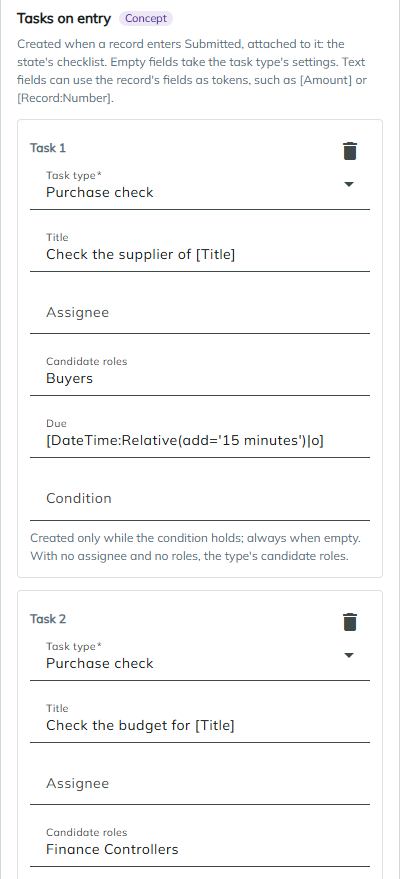
| Field | Description | When empty |
|---|---|---|
| Task type | The type of the task. Required. A type that no longer exists shows as "{key} (not found)". | |
| Title | The task's title. Supports tokens. | The type's name |
| Assignee | The user who gets the task: a user id, username or email, or a token. | |
| Candidate roles | Role names or ids, separated by commas. Supports tokens. | With no assignee either, the type's candidate roles |
| Due | A date or a token. A value that isn't a date after the tokens are replaced is ignored, and the type's due rule is used. | The type's due rule |
| Condition | An expression. The task is created only while it holds, for example [Amount] > 1000. | The task is always created |
Text fields can use the record's fields as tokens, such as [Amount] or [Record:Amount]. The record is read as it is when it enters the state, whoever runs the transition.
When every checklist task is completed
The transition to run once the checklist is done: Do nothing, or Run {transition} → {state} for each transition that leaves the state.
It runs once every task of the record's checklist is completed or cancelled and at least one is completed. The system runs it, on behalf of the person who completed the last task:
- the transition's allowed roles, "only on the user's own records" and the entity's edit permission don't apply,
- its condition, required fields, Before workflow and Prevent the transition do,
- the record's Last modified by and the transition workflows' User are that person,
- the transition's comment is "Every checklist task was completed".
It's tried once per checklist. If the transition is refused, the record stays in the state and the refusal is written to the log.
Open Checklist Tasks
Select a transition that leaves a state with Tasks on entry. Its Open checklist tasks section decides what happens to the checklist tasks of that state that are still open when the transition runs. The setting is Checklist tasks of {state} still open.
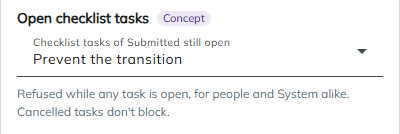
| Option | What happens |
|---|---|
| Cancel them | The open tasks are cancelled with the comment "The record left {state}" and leave everyone's list. This is the default. |
| Prevent the transition | The transition is refused while any checklist task is open, for people and for the system alike, with "{N} tasks still open: {titles}". Cancelled tasks don't block. |
| Complete them | The open tasks are completed as the person running the transition, with the comment "Completed by {transition}" and the Outcome you pick: an outcome name, or The type's only outcome. |
| Keep them open | The tasks stay as they are. |
With Complete them, the transition is refused when a task's type can't take the outcome:
- "{transition} can't complete the checklist task {title}: {type} has several outcomes, and the transition names none."
- "{transition} can't complete the checklist task {title}: {type} has no outcome {outcome}."
How a Checklist Runs
- A record is created in a state with Tasks on entry, or a transition moves it into one. The record gets a new checklist, and each task whose condition holds is created and attached to the record.
- The tasks show in My Tasks and on the record's tab for its List of Tasks property. They're created by the system, so their creator shows as "System".
- When a transition leaves the state, the checklist closes and the transition's Open checklist tasks setting applies to the tasks still open.
- If the record enters the state again later, it gets a new checklist with new tasks.
Only the tasks a checklist created count toward it. Tasks you create for the same record in other ways aren't prevented on, cancelled, completed or counted. A transition from a state to itself leaves the checklist alone.
If an item can't create its task, for example its type, user or role doesn't exist, or it ends up with neither an assignee nor a role, that task is skipped and the problem is written to the log. The other tasks are still created, and the transition isn't refused.
To list the tasks of one checklist, use the In the Same Checklist as Task option of the Tasks data source or the Get Tasks action.
Example: Checks on a Submitted Request
The Purchase Request lifecycle uses checklists on three states.
| State | Tasks on entry | When every checklist task is completed |
|---|---|---|
| Submitted | Purchase check Check the supplier of [Title], candidate roles Buyers. Purchase check Check the budget for [Title], candidate roles Finance Controllers, condition [Amount] > 5000. | Do nothing |
| Approved | Purchase order Place the order for [Title], candidate roles Buyers. | Run Order → Ordered |
| Ordered | Purchase follow-up Confirm the delivery of [Title], assignee [CreatedBy], the person who created the request. | Run Receive → Received |
On the transitions that leave Submitted, Approve is set to Prevent the transition and Reject to Cancel them.
What happens:
- An Employee submits a request for 3,900. It gets one task, the supplier check, for the Buyers; the budget check isn't created, because the amount is below 5,000.
- A Line Manager tries Approve and is refused with "1 task still open: Check the supplier of ...".
- A Buyer completes the check. The Line Manager approves, and the Buyers get the order task.
- A Buyer completes the order task. The system runs Order on the Buyer's behalf, and the request moves to Ordered. The creator of the request gets the follow-up task.
- If the Line Manager had rejected the request instead, its open checks would have been cancelled with "The record left Submitted".
Considerations
- The first List of Tasks property is used. When an entity has several List of Tasks properties, checklist tasks attach through the first one by name.
- Removing Tasks on entry doesn't close open checklists. Records already in the state keep their tasks, unless the transition they leave by has its own Open checklist tasks setting.
- Checklist tasks have no person as creator. Nobody sees them under Created by me, and only Task administrators can cancel them from the task panel. Choose the type's Task administrators with that in mind.
- Auto-advance needs a completed task. A checklist whose tasks were all cancelled doesn't run its transition.
- There's no user picker yet. Give users as a user id, username or email, or a token.
Revised 11/12/2026