Workflow History
BPMN 2.0 workflows are a concept feature. They're still being developed and can change before they're released. They're available only when the site's license includes the Concept feature Bpmn2.
Audience:
Low-code EngineersSkill Prerequisites:
Workflows
General Description
The History tab of App Builder › Workflows, beside Workflows and Contracts, lists the runs of BPMN 2.0 workflows in progress on this site: where each one waits or failed, how long it has been going, and the time it spent running its steps. From here you can cancel a run that waits or failed.
The tab shows only while the site's license includes the Concept feature Bpmn2. Test runs aren't listed. A run leaves the list when it completes or is cancelled.
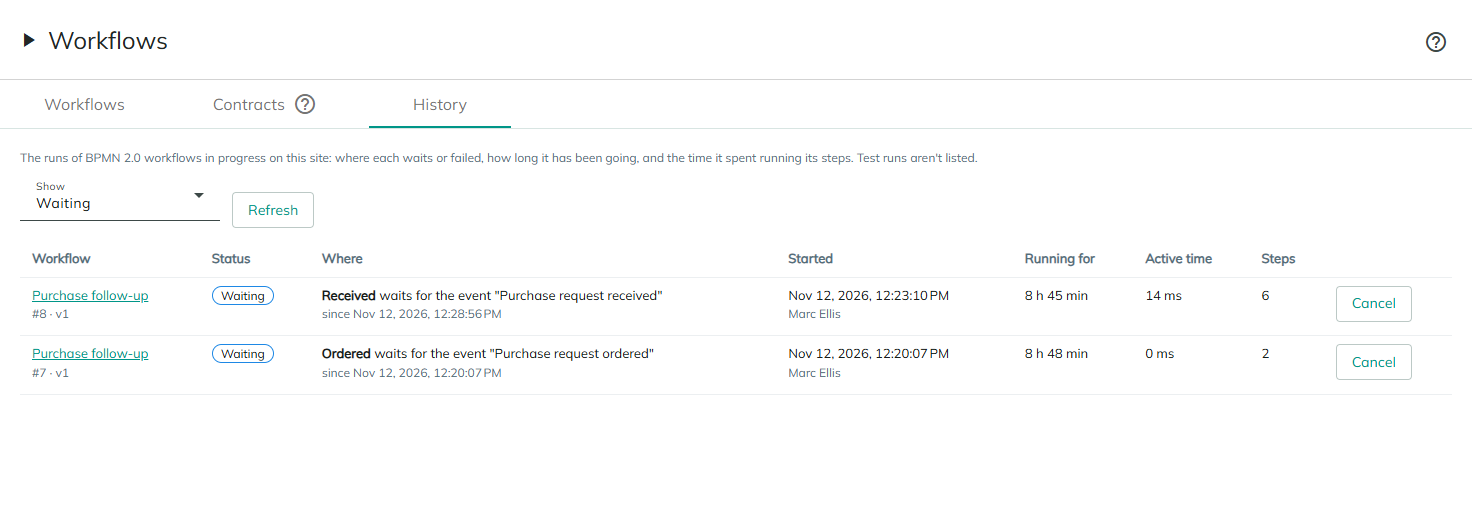
Showing runs
| Control | What it does |
|---|---|
| Show | Which runs to list: Waiting (the default), Running, Failed, or All in progress. |
| Refresh | Reads the list again. |
| Load older runs | The list shows 50 runs at a time, newest first. This adds the next 50. |
When nothing matches, the tab says so, for example No workflow is waiting. or No workflow has failed.
Statuses
| Status | Means |
|---|---|
| Waiting | The run is saved at one or more waits: a timer, an event, a user task's task, or a workflow it called. |
| Running | The run waited, and is now running its next steps in the background. |
| Failed | The run failed after a wait: an error that no error event caught, or its server stopped while it ran a step. It stays where it failed. |
A run that fails before its first wait isn't saved, so it isn't listed: its caller gets the error, as for any workflow.
Columns
| Column | What it shows |
|---|---|
| Workflow | The workflow's name, which opens it in the editor, or Deleted workflow #7. Below it, the run's number and the version it runs on, such as #12 · v2 · current is v3 when the workflow has changed since the run started. A run started by a call activity shows called by #9. |
| Status | Waiting, Running or Failed. |
| Where | For a waiting run, each wait, such as Wait 5 minutes waits for a timer, Wait for Purchase request ordered waits for the event "Purchase request ordered", Check budget waits for the workflow it called or Book the invoice waits for its task, with when a timer is due and since when it waits. For a failed run, At "Check supplier" and the error. For a running run, Running now. |
| Started | When the run started, and who started it. |
| Running for | How long since the run started. For a failed run, until it failed. |
| Active time | The time the run spent running its steps, without the waits, or unknown when it wasn't recorded. |
| Steps | How many elements the run has entered. |
Times show in their two largest units, such as 120 ms, 4.2 s, 12 min 5 s, 3 h 20 min or 2 d 4 h.
Cancelling a run
Cancel is in the last column of runs that are waiting or failed. A run that is running a step can't be cancelled, since the step would overwrite the cancellation when it ends.
- Select Cancel on the run.
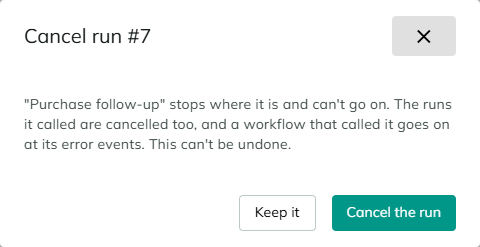
- Read the confirmation,
Cancel run #12: the workflow stops where it is and can't go on, the runs it called are cancelled too, and a workflow that called it goes on at its error events. This can't be undone. - Select Cancel the run, or Keep it to leave it.
When a run is cancelled:
- It ends as cancelled and leaves the list. What it saved while waiting is deleted.
- The runs its call activities wait for are cancelled with it. A called run that is running a step at that moment isn't cancelled: it ends on its own, and nothing waits for it any more.
- A workflow whose call activity waits for the cancelled run goes on at the call activity's error events, with the error code
Cancelledand a message that says who cancelled it. - The tasks its user tasks wait for are cancelled, as the system, with the comment
Run #12 of the workflow that created this task was cancelled.
If the run can't be cancelled, the tab says why above the list:
| Message | Means |
|---|---|
Run #12 is running a step right now. Try again in a moment. | The run started a step after the list was read. |
Run #12 has already ended. | The run completed or was cancelled after the list was read. |
Run #12 wasn't found. | The run doesn't exist on this site. |
The run couldn't be cancelled. | Something else went wrong. The details are in the log. |
Considerations
- A failed run can only be cancelled. Retrying a failed run, or moving a run to the workflow's current version, isn't available yet. Fix the cause, cancel the run, and start the process again.
- A run can't be stopped in the middle of a step. Wait until the step ends and the run waits or fails, then cancel it.
- Deleting a workflow doesn't cancel its runs. They stay in the list as
Deleted workflow #7. Cancel the runs you no longer need before you delete the workflow. - Finished runs aren't listed. The tab shows only the runs in progress.
Revised 11/12/2026