Testing and Debugging
BPMN 2.0 workflows are a concept feature. They're still being developed and can change before they're released. They're available only when the site's license includes the Concept feature Bpmn2.
Audience:
Low-code EngineersSkill Prerequisites:
Workflows,Tokens
General Description
You test a BPMN 2.0 workflow with the Test button, as any workflow. The test panel adds what a process needs:
- the path the run took, drawn on the diagram;
- the waits of the run, and buttons to get past them now: Fire now, Raise Event and Complete Task;
- breakpoints, where the test pauses so you can read and change its tokens, then Step or Continue;
- a step-by-step replay of the run, with what each step changed.
Opened from the editor, the test panel is docked beside the diagram, so you can watch the path and change breakpoints while the test runs. Close it with its close button or Escape. Opened from the workflows list, it's a dialog, without a diagram.
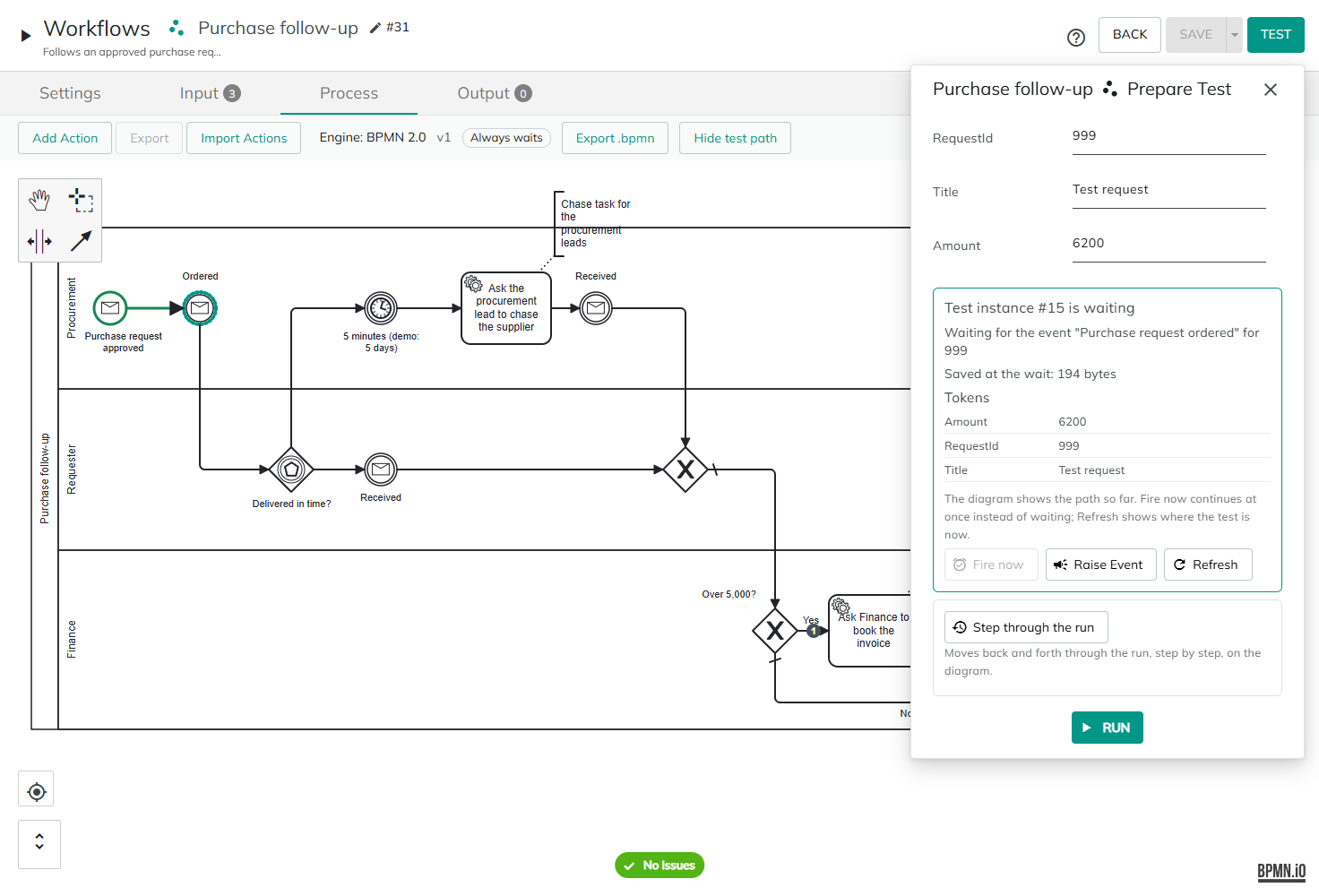
Running a test
- Select Test. The test panel opens with the workflow's inputs. Enter a List input as JSON rows, such as
[{"Name": "A"}]. - Select RUN.
The test runs as a test run, called a test instance. When it ends, the panel says Test instance #7 completed or Test instance #7 failed, with the outputs or the error, and the diagram shows the path the run took:
| On the diagram | Means |
|---|---|
| Green, thicker outline | An element or a flow the run went through. |
| Orange outline | An error event that caught an error. |
| Red dashed outline | Where the run failed. |
| Blue dotted outline | Where the test waits. |
The path stays until you change the diagram, or select Hide test path in the engine bar.
Test runs do real work. Their actions send emails, write records and call other systems, as a workflow test always has. Only user tasks behave differently: a test creates no task.
Test instances aren't listed in the History tab, and they're deleted 7 days after they last changed. The workflows that a test calls start test instances too. Events raised in a test reach only test instances and start no workflow.
Continuing a test that waits
When the test reaches a wait, the panel says Test instance #7 is waiting, with one line for each wait:
Waiting at "Wait 5 minutes" until 15 Dec 2026, 09:00Waiting for the event "Purchase request ordered" for 42, or… with no keyWaiting at "Book the invoice" for its taskWaiting at "Check budget", waiting for the called workflow (instance #8)
Below them are the size the instance saved (Saved at the wait: 40 KB), any warnings, such as a size above 1 MB or tokens left out, and the Tokens the instance holds. The diagram shows the path so far.
| Button | What it does |
|---|---|
| Fire now | Fires the instance's timers at once, instead of waiting, and continues the test. Available when the test waits at a timer. |
| Raise Event | Opens a Payload box: one value per line, as Name = value, such as Amount = 12.50. Raise raises the event to this test instance only, and continues it. When the test waits for several events, choose the Event first. |
| Complete Task | Completes or cancels the user task the test waits at. See Testing a user task. |
| Refresh | Shows where the test is now, for example after its timer fired by itself, or after the workflow it called continued. |
The path on the diagram continues across the wait. If an action fails, the panel shows why, such as The timer couldn't be fired. or The event couldn't be raised., with the server's reason.
Breakpoints, Step and Continue
A breakpoint makes a test pause before an element, so you can read the instance's tokens, change them, and go on one element at a time.
- Save the workflow. Breakpoints are offered on a saved BPMN 2.0 workflow.
- Select a task, a call activity, a subprocess, a gateway, an intermediate event or an end event at the top level, and choose Add breakpoint (test runs pause before this element, except on the branches of a parallel split). A red dot marks the element.
- Run the test. The panel says
Breakpoints: 2. The test pauses before each one, only at the top level of the workflow and outside the branches of a parallel split.
When the test reaches the element, it pauses: the instance is saved, as at a wait, and the panel says Test instance #7 is paused at "Amount check".
- Tokens. The panel lists the instance's tokens. Change a value to set it when you select Step or Continue. Values you change are set as text. A list, or a value longer than 2,000 characters, can't be changed here.
- Step runs one element and pauses again. A subprocess or a call activity runs as one step.
- Continue runs to the next breakpoint or wait.
Remove breakpoint on the element removes it. Breakpoints are kept in your browser, for each workflow. They aren't part of the diagram, so adding one doesn't change the workflow or its version.
Where a test pauses:
- only at the top level of the workflow, outside the paths of a parallel gateway. A breakpoint inside a subprocess or on a parallel path is passed, and the elements of a called workflow never pause;
- at a breakpoint in a loop, each time the loop reaches it;
- never in a real run: only test runs pause.
Fire now and Raise Event leave a paused test paused, and the paths they continue pause at your breakpoints. Breakpoints are kept with the test instance, so they also apply after a wait.
Stepping through a run
After a test, Step through the run replays it on the diagram, step by step, whether it completed, failed, waits or is paused. Use the first, previous, next and last buttons to move; the panel shows Step 3 of 9. Show the whole path goes back to the full path.
At each step, the diagram shows the path up to it and fills the step's element. The panel shows the element and what happened there, with the time:
| What happened | Shown as |
|---|---|
| The run entered the element | Entered |
| A task, subprocess or call activity finished | Finished its work |
| An error event caught an error | Error caught: PAYMENT_DECLINED (The card was declined.) |
| The run failed there | Failed: and the message |
| The test paused there | Paused here, before it runs |
With each step, the panel lists the tokens it changed, as Amount: 1200 → 6000, with new for a token that didn't exist and removed for one that was removed, and a list as its number of rows. It also lists each action's result: completed, stopped, failed, waiting or not run. Other steps show values the error event set, values merged at a parallel join, values you changed at a breakpoint, and values set when the test continued, such as an event's payload or a called workflow's outputs.
To keep a test small, a value is cut after 500 characters, and a step lists at most 100 changed tokens, then and 3 more.
Considerations
- Test what a real run will hold. A test with ten rows may save a few kilobytes at a wait, while a real run with many rows may pass the size limit. Watch the size and warnings in the panel. See What a run keeps while it waits.
- Workflows on the current engine keep today's test, without a path, waits or breakpoints.
- Real runs have no replay. Only test runs record their steps. For real runs, see the History tab.
Revised 11/12/2026